Kubernetes Resource Optimization Solutions: Top Tools Compared
At a high level, Kubernetes resource optimization tools address two related general challenges.
The first challenge is achieving workload efficiency. Are CPU and memory requests set accurately for what each pod actually uses? Over-provisioned requests reserve capacity that sits idle on every node. Under-provisioned limits cause CPU throttling and OOMKills, where the kernel kills containers that exceed memory limits under load. In most clusters, the waste starts here, with requests and limits that were set once and never revisited.
The second challenge is cost governance. Once savings exist, are they measured correctly, allocated to the right business unit, and enforced through policies that span the full cloud estate?
These are different challenges and aren’t equally relevant to all audiences. A platform team fighting OOMKills in a single cluster cares about the first; a FinOps lead reconciling a multi-cloud bill cares about the second.
The tools in the market are specialized and have strengths and weaknesses, which is why selecting the right tool for the job depends on which of the two challenges is of higher priority for your organization.
In this article, we evaluated four tools that platform engineers and FinOps practitioners most often evaluate: StormForge by CloudBolt, Cast AI, KubeCost, and ScaleOps. Each is assessed across five criteria as summarized in the table below.
Summary of Kubernetes resource optimization solutions
| Criterion | StormForge by CloudBolt | Cast AI | KubeCost | ScaleOps |
|---|---|---|---|---|
| Rightsizing automation | Best fit for predictable cycles: history-based profiles set targets per workload, applied automatically after a read-only observation period. | Pick it to cut node and instance costs; pod rightsizing reacts to current utilization only. | Fits teams that want recommendations with an apply step; actions ship off by default, and deeper automation is Enterprise-gated. | Best fit for irregular, high-churn workloads: continuous adjustment on live signals, no pod restarts, and read-only until switched on per workload. |
| Cost visibility scope | The pick when Kubernetes is one workload type among many. CloudBolt puts cluster costs beside VM and non-containerized spend in one model. | Enough to see cluster savings; reporting stops at the cluster boundary. | Strongest when Kubernetes is the whole estate: pod and container-level granularity, with billing integrations reaching some cloud spend. | Engineering-awareness reporting by cluster, namespace, team, and label; stops at the cluster. |
| Enterprise chargeback and financial integration | Built for estate-wide chargeback: container costs map against billing data with negotiated rates, in one workflow with non-Kubernetes spend. | Not built for this: no chargeback or financial system integration. | Mature inside Kubernetes, workable beyond it if tagging is disciplined. Tag-mapped cloud costs join the same chargeback reports. | Not built for this: no chargeback, no enterprise financial integration. |
| Governance and policy enforcement | The only option here for policy across Kubernetes and non-Kubernetes spend, with budget enforcement in one CloudBolt surface. | Access control only: RBAC exists, but budget enforcement and cost policies do not. | Fits Kubernetes-scoped governance: budget alerts, anomaly detection, and RBAC in Enterprise. Enforcement stays inside Kubernetes constructs. | Access control only: RBAC exists, but budget enforcement and cost policies do not. |
| Pricing model | Self-serve entry at $3/vCPU/month on AWS Marketplace with a 30-day trial. The full CloudBolt platform is org-scale and demo-gated. | Easy to model at a small scale: $1,000/month covers the first 500 CPUs, then $5/CPU/month. The per-CPU line grows with the cluster. | Free to start (Foundations, up to 250 cores). Enterprise runs $15,000/year for 250 cores on the public offer, private offers beyond. | Demo-gated with no public pricing; budget for a sales cycle to model cost. |
Rightsizing automation
Four tools, three different models, and different philosophies.
StormForge history-based automation
StormForge classifies workloads based on observed resource need and consults guardrail configurations before it sets any target. Individual workloads, whether they are out-of-the-box Kubernetes kinds such as deployments and daemonsets, or custom resources and workloads owned by custom operators like Dynatrace and Prometheus, get their own distinct machine learning models computed from historical CPU and memory usage. Changes to resources apply automatically and in-place without pod restarts where configured, but can also be subject to user approval. Alongside this proactive approach, reactive measures can be automated to remediate after OOM kills.
The read-only on-ramp
The trust model sets StormForge apart from other tools, which is an important part of the approach. StormForge starts in read-only observation mode. It monitors workload behavior and makes no changes until the team is confident in the recommendations. Namespace-level opt-in and opt-out control, which workloads are in scope, and rollback is built in.
ScaleOps follows a similar on-ramp. It installs via Helm, runs in read-only mode by default, and teams turn on automation per workload once they trust the recommendations.
Both rollouts lower adoption risk in the same way, so a key difference boils down to your application workload types, as we explain below.
ScaleOps real-time adjustment
ScaleOps continuously adjusts CPU and memory requests based on live cluster signals, without requiring pod restarts in supported configurations. The adjustments are context-aware: Latency-sensitive services receive more conservative changes than batch workloads, which avoids the over-correction that uniform resource changes cause. Context-aware adjustment is the platform’s core strength.
Cast AI node-layer autoscaling
Cast AI includes a pod-level workload autoscaler that responds to current utilization, but its center of gravity lies at the node level. Cast AI replaces the native Kubernetes autoscalers and autonomously selects instance types across Spot and on-demand pools, and its Spot interruption model flags at-risk nodes up to 30 minutes ahead. It is the most focused product of the four for reducing node cost at scale.
KubeCost recommendations-first automation
KubeCost is recommendations-first rather than recommendations-only. Savings Insights surface rightsizing opportunities, abandoned workloads, and underutilized nodes, and the cluster controller can apply request changes directly. Kubecost 3.1 added resource quota rightsizing, with recommendations applied straight from the UI.
The operational caveats matter: Actions ship disabled and are enabled through Helm; several automation features sit in the Enterprise tier; and applying changes is a reviewed, one-click, or scheduled step rather than continuous adjustment. Teams that skip that review cycle still watch savings accumulate on the dashboard. IBM has also announced Turbonomic integration for automated remediation on top of KubeCost; confirm its availability and behavior before a purchase decision.
Where the models diverge
The reactive and history-based models diverge most on predictable cycles. Consider a workload with an oversized request:
# Before: requests reserve far more than the workload uses
resources:
  requests:
    cpu: "2000m"      # observed p95 usage: ~650m
    memory: "4Gi"     # observed p95 usage: ~1.4Gi
# After rightsizing: requests track real demand with headroom
resources:
  requests:
    cpu: "800m"
    memory: "2Gi"
A reactive model converges to lower values after a few cycles. A history-based model sets them on the first optimization pass for a workload whose pattern is already known.
Key insight: For workloads with predictable cycles, StormForge’s history-based model provisions for the known shape from the start. For genuinely irregular, high-churn services, ScaleOps’ real-time model works well. Both start in read-only mode, so they have a lower risk than the ScaleOps approach. Qualify the workload composition to decide which approach may work best for your application environment.
Cost visibility scope
Two of the four reports cost only within the cluster. ScaleOps and Cast AI describe what workloads cost inside Kubernetes and stop at the cluster boundary. KubeCost extends beyond its cluster-tool reputation: Cloud billing integrations ingest billing data from AWS, Azure, and GCP, and its Cloud Costs reporting covers out-of-cluster spend alongside the cluster.
KubeCost cluster-first allocation
KubeCost has the deepest Kubernetes allocation of the group. Built on OpenCost, the project that the company donated to CNCF, it attributes costs to namespaces, labels, deployments, services, pods, and containers using a methodology validated across thousands of clusters.
The Enterprise tier reconciles against actual billing data from each provider’s raw feed: the Cost and Usage Report (CUR) on AWS, Microsoft Customer Agreement (MCA) billing on Azure, and the billing export on GCP. That reconciliation replaces estimated on-demand rates with invoice actuals. For pure Kubernetes visibility, this is the most established approach in the category.
ScaleOps and Cast AI cluster reporting
ScaleOps reports cost by cluster, namespace, team, and label for engineering awareness. Cast AI reports utilization and savings by workload, namespace, and team. Both views show where spending concentrates and what optimization is saving; neither crosses the cluster boundary.
CloudBolt estate-first model
The CloudBolt platform approaches the same problem from the opposite direction: estate-first rather than cluster-first. CSMP (Cloud Spend Management Platform) uses StormForge telemetry to ingest Kubernetes cost data into a multi-cloud cost model that also covers VM and non-containerized spend across AWS, Azure, and GCP. Kubernetes and the rest of the estate appear in the same view, without a manual reconciliation step every reporting cycle. For a team where Kubernetes is one workload type among many, that single model is the difference that decides the platform.
The trade-off: CSMP’s container-level Kubernetes allocation was announced at KubeCon NA 2025 and is newer than KubeCost’s OpenCost foundation. On pure Kubernetes granularity and methodology maturity, KubeCost’s track record carries weight. However, CloudBolt’s counter-value proposition is important and aligned with a holistic and native cost management model: cost allocation occurs within a billing-native structure across all types of spending, rather than using external costs mapped to Kubernetes cluster constructs via tags.
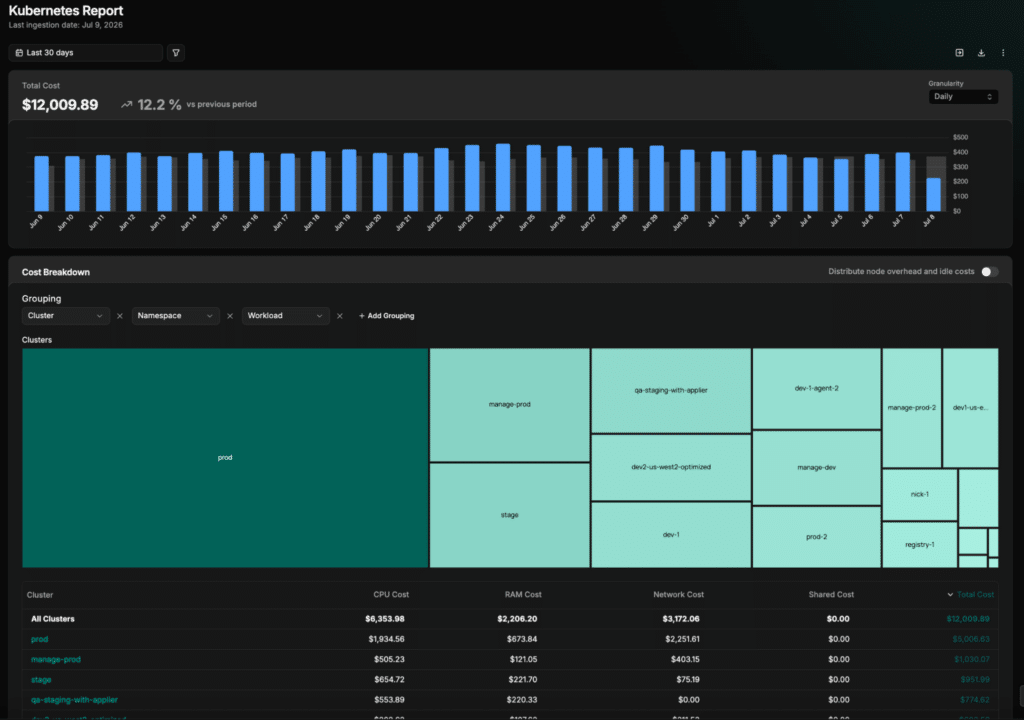
Key insight: If cost reporting must span both Kubernetes and non-Kubernetes infrastructure in a single view, ScaleOps and Cast AI leave a reconciliation gap by design, and KubeCost covers it only to the extent tagging discipline allows. If Kubernetes is the whole estate, KubeCost’s granularity is the stronger answer.
Enterprise chargeback and financial integration
Two of the four tools support chargeback, and two do not.
KubeCost tag-mapped chargeback
KubeCost has mature Kubernetes chargeback within its scope: namespace and label-based allocation, configurable showback and chargeback reports, and Enterprise-tier RBAC controls on who sees which cost data. Inside Kubernetes, it is fully functional, and it does not stop at the cluster.
Because KubeCost ingests cloud billing data, tag mapping can attribute non-Kubernetes resources, such as managed databases or object storage, to the namespaces and teams that consume them. Those costs land in the same Allocations view and chargeback reports. The limit is the mechanism. Attribution quality depends on tagging discipline across the estate, and the model stays Kubernetes-first: External spend is mapped onto cluster constructs, not allocated in a billing-native structure with negotiated rates and discount handling built in.
CloudBolt billing-native chargeback
The CloudBolt platform maps container-level costs, drawn from StormForge telemetry, against billing data in the FOCUS format, the FinOps Foundation open billing specification, including negotiated rates, committed use discounts, and credits. It then routes Kubernetes and non-Kubernetes spend through the same chargeback workflow. Configurable discount pass-through lets you attribute reserved instance savings to the team whose workloads generated the commitment, or absorb them centrally.
Where Cast AI and ScaleOps stop
Cast AI and ScaleOps do not have chargeback capability. Their savings are real, but the numbers are not connected to an enterprise financial workflow. For a team whose only goal is to lower spending, that absence does not matter. For a team that has to charge costs back across business units, it means adding a second platform to cover the step.
Key insight: If the requirement includes connecting Kubernetes savings to enterprise financial workflows or producing chargebacks across the full estate, Cast AI and ScaleOps have no mechanism to support it. KubeCost can fold tag-mapped cloud costs into its chargeback, with quality tied to tagging discipline. Billing-native chargeback across the full estate remains the CloudBolt platform’s ground. That criterion decides fit before the rightsizing comparison begins.
Governance and policy enforcement
Governance separates platform-scope tools from cluster-scope tools more cleanly than any other criterion.
KubeCost Kubernetes-scoped enforcement
KubeCost Enterprise provides Kubernetes budget alerts, cost anomaly detection, and RBAC controls on cost access. Its visibility no longer stops at the cluster, since reports and alerts can draw on cloud costs pulled in through billing integrations. Enforcement is the narrower part. Policies are defined and applied through Kubernetes constructs, so spending controls for VMs, SaaS, and other resources still live in whatever tool governs that spend.
CloudBolt cross-estate policy
The CloudBolt platform provides budget enforcement, RBAC cost controls, and cost policies that span Kubernetes and non-Kubernetes infrastructure on one surface. FinOps and finance teams get a single place to set limits, configure alerts, and enforce policy across all spend, rather than having to use one governance tool per infrastructure type. For organizations with a formal FinOps program where policy enforcement is a control requirement, the cross-environment scope is the structural difference.
Cast AI and ScaleOps access control
Cast AI and ScaleOps cover the access-control side of governance, not the spend-policy side. Cast AI provides organization and cluster-scoped RBAC, including an Analyst role built for cost visibility, and ScaleOps supports RBAC-based access policies in its platform.
What neither provides is budget enforcement or cost policy: no spending limits, no controls that flag or block spending against a budget. Both were built to optimize resource consumption inside the cluster, and governance spending was never part of that design scope. ScaleOps has publicly positioned a roadmap toward broader cloud and AI infrastructure management, so the gap may narrow, but a multi-year decision rests on shipped capability.
Key insight: If budget enforcement and cost policy must cover both Kubernetes and non-Kubernetes infrastructure, only the CloudBolt platform provides this. KubeCost enforces through Kubernetes constructs; Cast AI and ScaleOps stop at access control.
Pricing model
Pricing transparency varies widely across these four tools.
Cast AI per-CPU pricing
Cast AI’s Growth plan on AWS Marketplace runs $1,000 per month, covering up to four managed clusters and the first 500 CPUs, with usage beyond that charged at $5 per CPU per month. A 1,000-CPU environment models to about $3,500 per month: the base fee plus $2,500 for the second 500 CPUs. Reviewers on G2 and Gartner Peer Insights flag pricing complexity and billing transparency at scale as recurring concerns.
KubeCost per-core pricing
KubeCost’s list pricing is no longer fully public. The Foundations tier is free for up to 250 cores. Enterprise is sold per core: the AWS Marketplace public offer is a $15,000, 12-month subscription covering up to 250 cores, with larger deployments priced as private offers. Since the acquisition, third-party FinOps guides report steeper enterprise pricing, and adopting Enterprise pulls an organization toward the broader IBM FinOps bundle alongside Apptio Cloudability and Turbonomic.
StormForge and ScaleOps pricing
StormForge lists at $3 per vCPU per month on AWS Marketplace, with no base fee for the rightsizing product and a 30-day self-serve trial. The full CloudBolt platform is org-scale and demo-gated, consolidating Kubernetes allocation, multi-cloud management, and rightsizing into one contract. ScaleOps is also demo-gated with no public pricing.
Key insight: At a few hundred CPUs, per-CPU and per-node list pricing is easy to model, and the focused tools look cheap. At several thousand CPUs, the per-CPU component becomes material, and the number that matters shifts to total tooling count across Kubernetes and non-Kubernetes cost management.
Which solution fits your environment?
No single tool leads in all five criteria, and no single layer of the problem is every team’s bottleneck.
Choose Cast AI if node infrastructure cost is the target and you want autonomous Spot orchestration and instance selection. Its GPU sharing via time-slicing and MIG, NVIDIA’s hardware-level GPU partitioning mode, suits AI and ML inference. An existing Karpenter setup has two paths: the Karpenter Enterprise suite runs alongside open-source Karpenter and leaves it as the node provisioner, while the full Cast AI autoscaler replaces Karpenter and requires a migration.
Choose ScaleOps if real-time, context-aware pod rightsizing in a fully self-hosted, no-egress architecture is the requirement, particularly in regulated or air-gapped environments where data residency is a hard constraint. For teams with mostly irregular or high-churn workloads, the real-time model is a strong fit.
Choose KubeCost if Kubernetes sits at the center of your cost picture, and allocation granularity is the priority. Its cloud billing integrations extend reporting beyond the cluster, ensuring consistent tagging. The OpenCost foundation is a validated methodology in the category, and the Business or Enterprise upgrade is the lowest-friction path for a team already running the free tier. However, weigh the risk of the IBM licensing model and the acquisition’s impact on the product roadmap.
Choose StormForge by CloudBolt if rightsizing safely and based on application workload are important, especially in a production environment (vs. staging or testing). StormForge handles the pod-level work with a read-only-first trust model that suits teams cautious about automated changes. The CloudBolt platform handles cost allocation across the full estate, chargeback that crosses the cluster boundary, and governance spanning Kubernetes and non-Kubernetes infrastructure, which the cluster-scoped tools do not reach.
The decision should follow the challenge that is of higher priority for each organization. If pod resource settings or node costs are the current problem, a focused optimizer can clear it, and any of the first three may be a better point solution. If Kubernetes optimization has to land in a finance report or an estate-wide policy, scope decides fit before any feature comparison begins.
The concrete next step is the same in either case: Run the tool that matches your current bottleneck against your own cluster and billing data, not a vendor demo environment. See whether it changes the number that brought you here.


Related Blogs
Open-Source Kubernetes Resource Review Mixin
Standard Kubernetes dashboards suffer from a massive engineering blind spot: the moment a container crashes, updates, or scales down, its…