


StormForge by CloudBolt
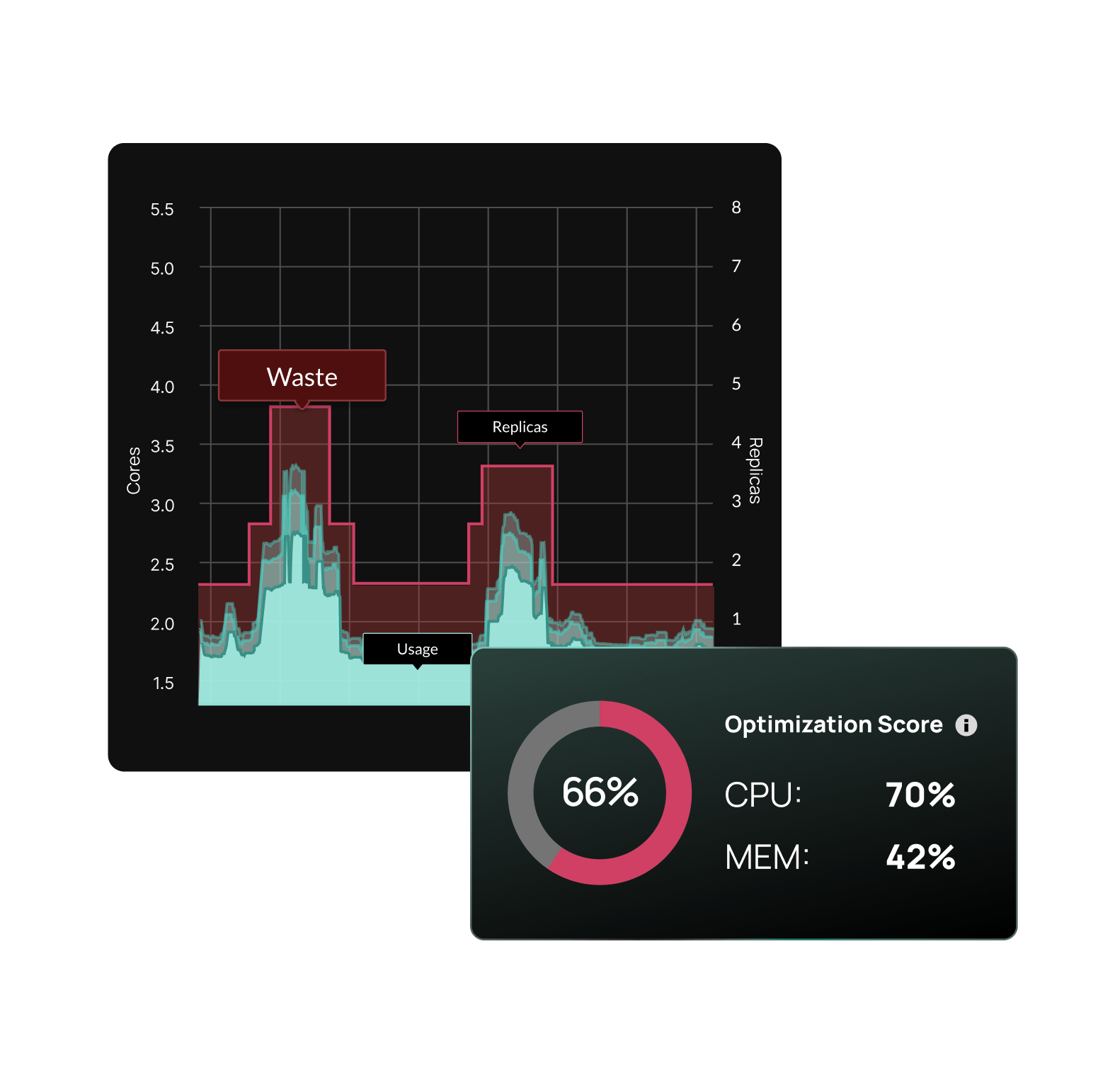
ML-powered recommendations
Every workload gets its own model.
StormForge doesn’t use static percentiles or short-term averages. Each workload gets a dedicated ML model trained on 28+ days of observed usage data, capturing weekly patterns, daily cycles, and burst behavior that shorter observation windows miss.
Per-workload ML models
- Each workload modeled independently
- A Java API server with weekly traffic spikes gets a different model than a batch processor that runs overnight
- The ML captures the shape of each workload’s resource usage over time, including patterns that repeat on weekly and daily cycles
- Fundamentally different from VPA’s decaying histogram, which weights recent data heavily and can take days to converge after a deployment or version change
Patented approach
- StormForge’s ML methodology is patented
- In production since 2022, continuously refined across environments ranging from hundreds of workloads to over 500,000
- Models improve as they observe more data
- Recommendations update on a configurable schedule so they stay current as workload behavior evolves
JVM and Java heap optimization
- Detects JVM workloads automatically
- Optimizes Java heap settings alongside container resource requests
- Prevents the common failure mode where a memory recommendation looks correct from the container’s perspective but starves the JVM
OOM protection
- Memory recommendations include safeguards against out-of-memory kills
- Analyzes observed memory usage patterns and workload behavior to set memory requests with sufficient headroom
- Prevents OOM kills without the excessive padding that drives up costs
- If a workload’s memory profile shifts, the model adapts and proactively responds immediately
~2 min
to first recommendation after agent install.
HPA workload optimization
Your autoscaling behavior remains how you want it.
StormForge optimizes HPA-managed workloads through bi-dimensional autoscaling. When other tools alter requests, they change the workload’s scaling profile, causing thrash and unexpected behavior. StormForge detects scaling behavior and updates requests alongside HPA target utilization to preserve intended scaling.
Bi-dimensional autoscaling
- When requests change, the utilization ratio HPA uses to trigger scaling shifts
- If you only adjust requests without updating the HPA target, you change when and how aggressively the workload scales
- Our patented bi-dimensional autoscaling solves this by treating requests and HPA targets as a coupled pair, preserving your intended scaling behavior while reducing resource waste
Continuous HPA reconciliation
- The StormForge Applier watches settings and detects drift
- When something changes outside of StormForge, it reconciles, automatically restoring optimized values
- When Argo CD, Flux, or another CD tool deploys, StormForge manages the source of truth for optimized settings, ensuring the correct requests are deployed as the workload gets updated
- What StormForge optimized stays optimized, until a new recommendation says otherwise
The Agent + Applier
Start with visibility. Add automation when you’re ready.
Not every team is ready to automate optimization on day one. Some need to see the recommendations first, build trust with the data, and prove value before granting write access. StormForge runs as three lightweight, self-optimizing pods. Install them together or separately depending on where your team is.
The Agent: observe and recommend
- The controller watches your workloads and configuration
- A dedicated Prometheus pod handles metric scraping from your workloads
- Collects CPU, memory, and usage data and forwards it to the StormForge SaaS backend
- Unlike self-hosted optimization tools that require a full Prometheus stack for storage and processing, this pod handles scraping only
- No local storage, no retention management, no scaling concerns
- The SaaS-hosted ML engine analyzes usage patterns and generates right-sizing recommendations on the schedule you define
- First recommendation takes just a few minutes
The Applier: execute with precision
- An optional, separately installable component that applies recommendations to your workloads
- Three apply methods give you control over how changes land:
- Server-side patches: direct resource updates to workload specs
- Mutating admission webhook: enables in-place pod resizing and advanced rollout strategies (Immediate and Hybrid)
- GitOps export: download recommendations as patches for CI/CD-driven apply.
- After applying, the Applier validates rollout health and monitors the workload
- If something goes wrong, it catches it
- If HPA targets drift, it reconciles
- If a CI/CD deploy overwrites optimized request settings, it reapplies
Policy-based configuration
- Platform teams set org-wide defaults and guardrails
- Application teams tune behavior within the namespaces they own
- Policies cascade in deterministic order, targeting workloads by namespace, label, or type
- Out of the box defaults cover majority of the workloads, exceptions handled via code
How does your Kubernetes utilization compare?
See how your cluster’s CPU and memory utilization stack up against industry peers, and get a free, personalized report on where idle spend is hiding.
Get your free report nowSaaS delivery model
All the intelligence in the cloud. Minimal footprint in your cluster.
Many Kubernetes optimization tools are self-hosted, meaning the recommendation engine, analytics, and data storage all run inside your cluster. Full control, but at the cost of operational overhead that scales with every cluster you onboard.
3
self-optimizing pods
Total in-cluster footprint
0
Prometheus databases to run
Scraping only — no storage, no retention
SOC 2
Compliant
No sensitive workload data leaves your cluster
What gets installed in-cluster
- The StormForge Agent workload controller, metrics forwarder, and Applier — all three lightweight and self-optimizing
- Metrics forwarding and applying recommendations
What runs in SaaS
- The ML recommendation engine
- The web UI
- All historical data and analytics
- No self-hosted Prometheus dependency at scale
- No cluster-side data warehousing
No bundled infrastructure to manage
- Competitors that run self-hosted require you to operate their Prometheus instance, manage their storage, and scale their infrastructure alongside yours
- StormForge streams a targeted set of resource metrics to the SaaS backend via HTTPS — your cluster stays lean
TCO advantage that compounds over time
- Self-hosted tools add operational overhead to every cluster you onboard
- SaaS overhead stays flat
- At 10 clusters, the difference is noticeable. At 50, it’s a line item
Calculate the total cost of ownership difference:
TCO Calculator →Trusted by the world’s largest financial institutions
- Metrics are scoped to resource usage and performance data, not application payloads
- Data is transmitted over HTTPS
- SOC 2 compliant
- No sensitive workload data leaves your cluster
Works with your stack
Your stack stays yours. StormForge fits inside it.
Rip-and-replace doesn’t work for platform teams managing production Kubernetes. You’ve already invested in your GitOps pipeline, your observability stack, and your deployment model. StormForge works alongside all of it.
GitOps: Argo CD + Flux
- Native integration with both
- Configure StormForge as a recognized field manager in Argo CD
- Mutate pods directly alongside Flux to prevent reconciliation conflicts
- Or skip the Applier entirely and export recommendations as patches for your CI/CD pipeline
Scaling: KEDA + HPA
- Full support for workloads scaled by KEDA ScaledObjects
- HPA target utilization is reconciled automatically, not just respected, actively maintained
Platforms: EKS Add-On + OpenShift
- Available as an AWS EKS add-on for streamlined procurement and installation
- Dedicated install path for Red Hat OpenShift Container Platform
- Supports any Kubernetes flavor (EKS, AKS, GKE, etc.)
Three ways to apply recommendations
- Server-side patches (default)
- Mutating admission webhook (for in-place resizing)
- GitOps export (for CI/CD-driven apply)
- Pick the method that fits your deployment model
Why platform engineers choose CloudBolt
90% faster time-to-savings
From months to hours, for immediate cost reductions.
Reduced manual work
Eliminate repetitive, unsustainable resource tuning
Up to 80% in Kubernetes savings
Right-size workloads and reduce your node footprint.
99% allocation accuracy
Maximize node efficiency and avoid wasted spend.
Ready to put Kubernetes rightsizing on autopilot?
*Free trial includes full optimization on 1 cluster for 30 days.
Start free trial

Related resources

How Acquia cut web node infrastructure by 65% with continuous Kubernetes rightsizing
Acquia modernized a platform that previously ran on roughly 26,000 EC2 nodes by moving to Kubernetes. The goal wasn’t just containerization—it was elastic scaling for traffic spikes without relying on fixed “small/medium/large” sizing. Results at a glance 65% reduction in web node footprint 99.99% availability delivered consistently 26,000 EC2 nodes as the legacy baseline modernized […]
Kubernetes utilization benchmark calculator
Kubernetes utilization benchmark How does your Kubernetes utilization compare? See how your cluster’s CPU and memory utilization stack up against your industry, and find out where idle spend is hiding. Avg CPU utilization Cluster-wide, last 30 days % Avg memory utilization Cluster-wide, last 30 days % Industry vertical Select an industry…Technology / SaaSFinancial ServicesRetail / […]
StormForge Optimize Live: 5-minute demo
StormForge Optimize Live gives teams a clear, intelligent, and automated way to right-size every Kubernetes workload with confidence. In this short walkthrough, Product Manager Nick Walker shows how Optimize Live provides instant top-down visibility across clusters, surfaces both waste and underprovisioning risks, and generates precise, usage-based recommendations that improve performance while reducing cost. Viewers will […]