Manage your cloud infrastructure through MCP
CloudBolt’s cloud management platform, CMP, has a Model Context Protocol (MCP) server that lets you work with it by describing what you want in plain language, rather than navigating the UI or writing to the API. It connects an AI assistant to CMP over the MCP, an open standard for letting assistants call the tools a server exposes: you describe a task, and the assistant carries it out in CMP.
CMP is built for managing complex cloud environments, and anyone who’s spent time in it knows there’s a learning curve. Natural language changes the way in — you can get a specific task done without first learning your way around the whole platform.
How it works
Connect an MCP-compatible assistant—Claude, Cursor, VS Code, or a self-hosted option like OpenCode—to your CMP instance, then type requests in plain language:
- “Show me my servers and their statuses.”
- “Power off my-server-001.” (Most clients confirm before making a change like this.)
- “How much am I spending in the Quality Assurance group?”
Here’s the first one running against a live instance.
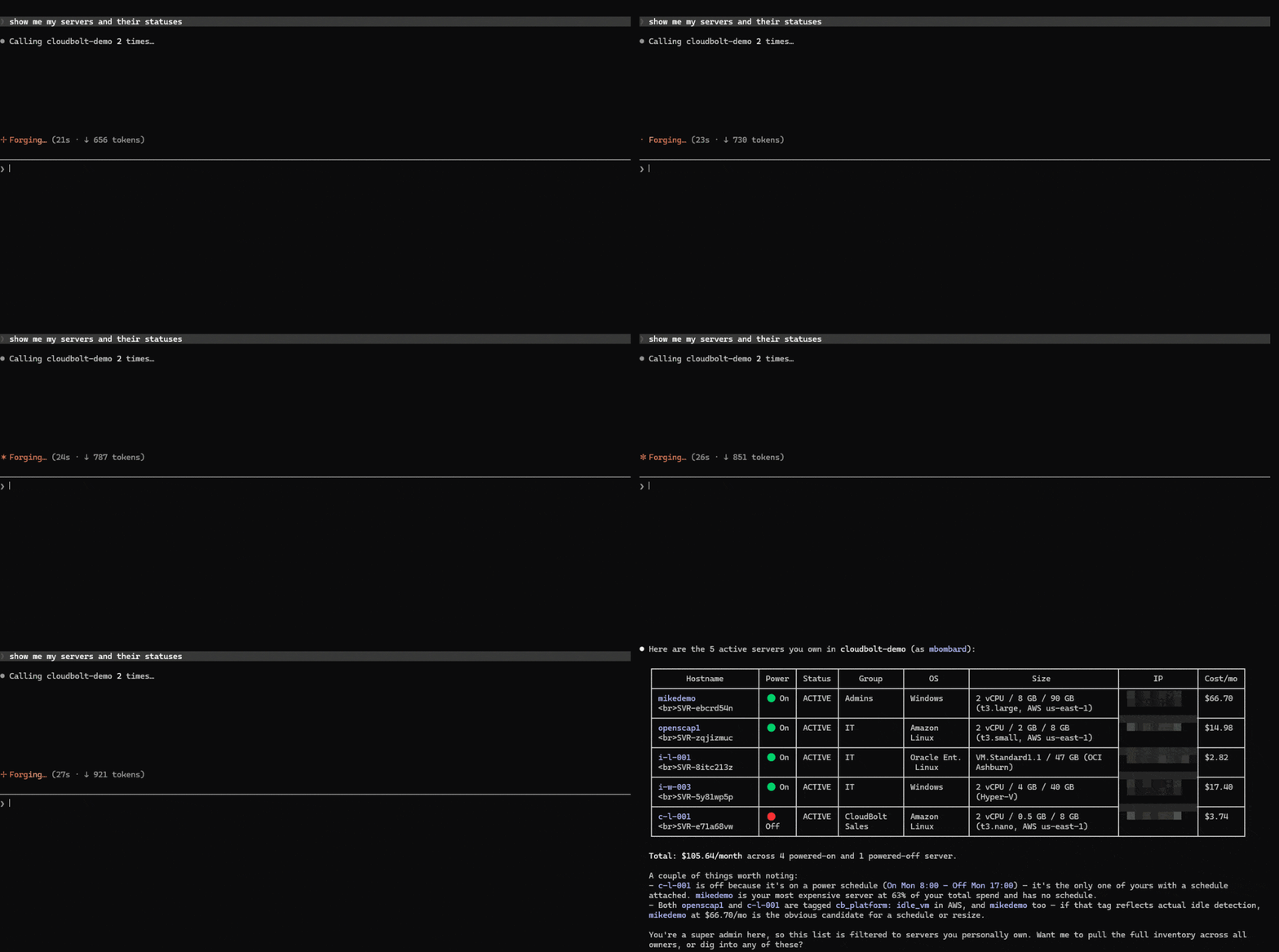
The assistant maps each request to CMP’s underlying tools and returns the result. Because MCP is an open standard, this works with any compatible client rather than a CloudBolt-specific app.
Permissions and access
The assistant is scoped to your permissions in CMP, so it can only see and act on what your account is allowed to.
Reads and writes are handled separately. Read-only requests return information and change nothing. A write scope lets the assistant submit a change, but the change still has to clear whatever approval workflows your admins have set, exactly like any other CMP order. Most clients also echo an action back for your confirmation before it gets that far. The same permissions and audit logging that already govern CMP apply here too.
What you can do
Through MCP, CMP handles both reads and writes.
Read
- List and inspect servers, resources, environments, groups, jobs, and orders
- Check spend
Write
- Run day-two actions like snapshots and resizes
- Set power schedules
- Order from the service catalog
- Approve or deny pending requests
Requests can chain, too. “Find every server in these two groups with no power schedule and set them to power off at 7pm on weekdays” runs as a single instruction instead of an afternoon of clicking.
Want to run that yourself? Try it in a sandbox.
Getting started
Connect an MCP-compatible client to CMP and authorize it through OAuth. To check the connection, ask “Who am I according to CloudBolt?” and the assistant should return your CMP profile. From there, you’re set to try anything above.
MCP support is part of CMP today. To see it in action, watch the demo.
Run your first plain-language request in a live sandbox
Start your sandbox




Related Blogs
The Technical Guide to Kubernetes Rightsizing from LearnKube
The Technical Guide to Kubernetes Rightsizing from LearnKube is a comprehensive, hands-on guide to safely optimizing CPU and memory across…