Where GPU waste hides on Kubernetes
GPUs are the most expensive resource most teams run, and the hardest to account for. On Kubernetes, where pods share GPUs, standard tooling can tell you a GPU is busy but not which workload is making it busy. That gap is where GPU waste on Kubernetes hides.
In the FinOps Foundation’s 2026 survey of 1,192 practitioners managing $83B+ in cloud spend, 98% of teams said they now manage AI spend—up from 31% two years earlier. Granular monitoring of that spend, including GPU utilization, was the number one capability practitioners said their tooling doesn’t have.
For environments where multiple pods are sharing a GPU, the tooling required is essentially non existent. Today’s tools give each pod the same number, so if you have three pods sharing a GPU, all three look like they are using the whole GPU. Add it up and the GPU reads as 300% utilized, which tells you nothing about what any single workload is actually using.
Why device-level GPU tooling can’t see it
NVIDIA’s DCGM reports utilization and memory per physical device, not per workload. On a GPU dedicated to a single pod, that’s fine, but the moment it’s shared, every pod on it inherits the same device-level number. With many pods on one device you can’t see what any one of them is using.
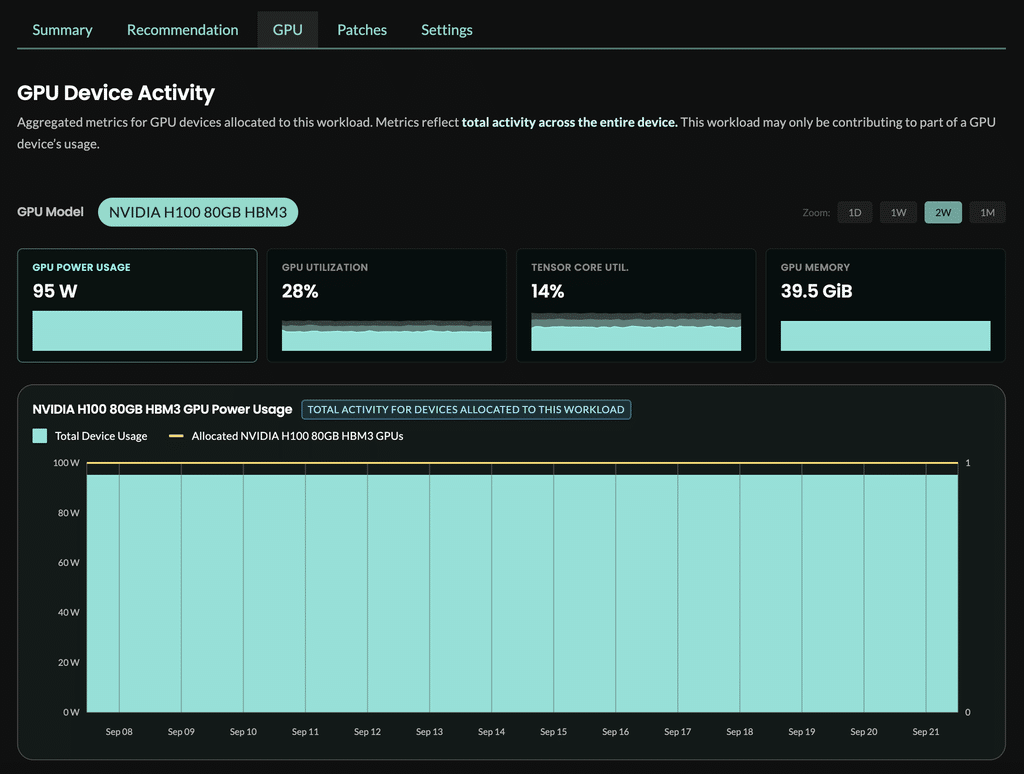
Getting a true per-workload number means going a level deeper: reading GPU state per process, mapping those processes back to pods, and reconciling that against what Kubernetes allocated. Existing tooling stops at a device-level dashboard. It never answers the question you actually have: what each workload is using, and where capacity is going to waste.
What teams do today, and why it doesn’t hold
Most teams have at least basic visibility into GPU usage, but it’s rarely enough to feel confident about reducing waste. They usually settle on three simple practices:
- nvidia-smi spot checks. Useful for one node in the moment, but gone the second you close the terminal. There is no attribution across a fleet and no history.
- Per-node or per-device dashboards. They show that a GPU is busy, not which of the ten pods on it made it busy.
- Namespace tagging and spreadsheets. Where most teams end up: hand-mapping pods to owners and estimating shares. It breaks the moment workloads move or scale, which on Kubernetes is constant.
The pattern underneath all three is the same. They infer per-workload use from device-level data, and inference is not measurement. In a small-scale environment you can eyeball it. But in a real environment, with dozens of pods sharing a GPU, the guessing stops working, and that’s when the GPU bill is largest.
What per-workload GPU visibility takes
StormForge runs a lightweight agent on GPU nodes. It reads GPU use and memory per workload, even on time-sliced GPUs where the standard exporter can’t, and maps it back to the pods actually running. You get an accurate per-workload view of GPU use and you can see where it sits idle or underused.
It’s an extension of the StormForge agent and requires no DCGM setup to stand up. Just enable the new Node Agent and per-workload GPU use shows up in StormForge within minutes, alongside the rest of your Kubernetes infrastructure.
Want to see it on your own cluster? Request early access.
What you can do once you can see it
Seeing the waste is only useful if it leads to a decision. Say you find a training job holding a full eight-GPU node at a fraction of its capacity while smaller jobs queue for hardware. StormForge surfaces that, then recommends a better-fit node type, for example moving that workload onto a four-GPU node.
You can also see GPU cost broken down by cluster, namespace, and workload, so you can tell which teams are driving the most waste.
See per-workload GPU use on your own cluster
Request early access




Related Blogs

What is Cloud Automation and Orchestration?
Cloud automation is the use of software, scripts, and workflows to complete individual tasks in a cloud environment, like provisioning…