Kubernetes for Black Friday: Scaling Up for the Peak and Back Down After
Black Friday falls on November 27 this year, and if you run the platform behind an online store, you’ve probably been planning for it since summer. Last year US shoppers spent a record $11.8 billion online that day, according to Adobe Analytics, with spending reaching $12.5 million a minute at the midday peak. Traffic at that level can spike in seconds, while a new Kubernetes node takes several minutes to provision, pull images, and pass readiness checks before it can serve a request.
So teams prepare the way they usually do. They raise minReplicas, turn off scale-down, add spare nodes, and pause anything that could change production. Those moves make sense for the event. The trouble starts the week after Cyber Monday, when traffic drops and the settings stay where they were.
Why Kubernetes capacity shows up late
When traffic jumps, several things have to happen in order before a new pod can take a request. The Horizontal Pod Autoscaler (HPA) sees higher utilization and raises the replica count, which it checks every 15 seconds by default. If no node has room for the new pods, they sit in Pending until Cluster Autoscaler or Karpenter requests a machine from the cloud provider. That machine has to boot, join the cluster, and start its DaemonSets. Then the kubelet pulls the container images, and the app has to start and pass its readiness probe.
Add those up and you get time-to-ready, the gap between the first extra request and a new pod that can serve it. On most managed clusters that runs several minutes, and most of it goes to node provisioning, image pulls, and app startup rather than the autoscalers themselves. HPA can react within seconds, but it can only place pods on nodes that already exist.
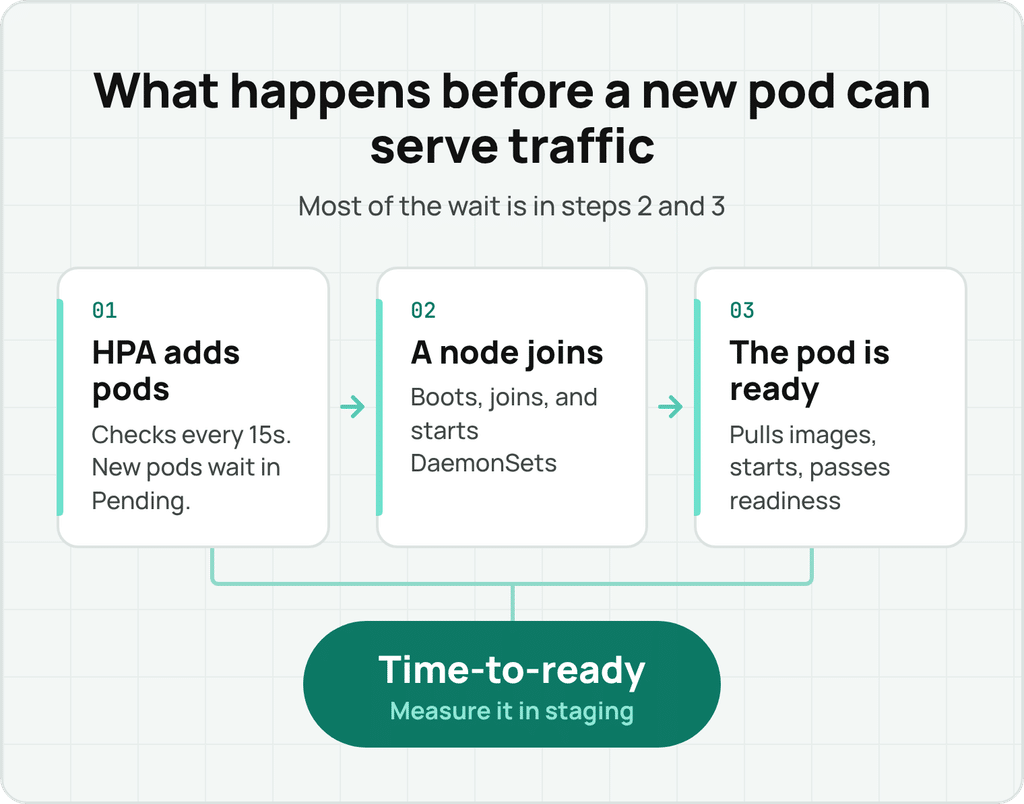
If you haven’t measured time-to-ready on your own clusters, do it this week in staging. Scale a test deployment past what the current nodes can hold and compare each pod’s creation timestamp with the time it reported Ready. That number tells you how much spare capacity you need going into the weekend.
Autoscaler settings for the final week before the peak
A full change freeze is the usual instinct, but it also turns off the autoscalers you need when traffic spikes. The narrower goal is to block anything that removes or replaces capacity during the event and leave scale-up running.
- HPA. Raise
minReplicason customer-facing services to cover your expected weekend baseline, and check thatmaxReplicasis high enough that HPA never hits the ceiling. Settingbehavior.scaleDown.selectPolicy: Disabledstops HPA from removing replicas without touching scale-up. - Cluster Autoscaler. Annotate nodes with
cluster-autoscaler.kubernetes.io/scale-down-disabled=true, or block scale-down cluster-wide. Check--max-nodes-totaland your cloud account quotas too, since either one can stop a scale-up. - Karpenter. Add a disruption budget of
nodes: "0"with a schedule and duration that cover Thanksgiving through Cyber Monday. That pauses consolidation and drift replacement for the window. HoldNodePooledits until afterward, because an edit can mark nodes as drifted. - Spare capacity. A small Deployment of placeholder pods with a negative
PriorityClasskeeps extra nodes warm. With Cluster Autoscaler, keep that priority at -10 or higher, since pods below the cutoff don’t trigger a scale-up and the buffer won’t rebuild. Real pods preempt them right away, and the autoscaler rebuilds the buffer in the background. Size it to the number of pods your busiest service added in one time-to-ready window during last year’s peak. - Rightsizing. Whatever sets your pod requests, keep increases on and pause decreases for the event. A request that shrinks on Friday morning takes away headroom HPA is counting on. In StormForge that’s a single setting, and you can see how it works in the sandbox without installing anything.
Pick an owner for each layer and agree ahead of time on what triggers an escalation, such as a service reaching maxReplicas or pods sitting in Pending longer than your measured time-to-ready.
Scaling back down after Cyber Monday
Every change in the last section was meant to be temporary, and most of them stay in place until someone reverts them. The prep usually has an owner and a deadline, and the rollback often has neither.
Nothing breaks when these settings stay in place, so it’s easy to miss a raised minReplicas, a placeholder deployment nobody scaled to zero, or a Karpenter disruption budget added without a schedule, which blocks consolidation until someone removes it.
Give the unwind its own date on the calendar, ideally the first business day after traffic settles, and work through it in order:
- Lower
minReplicasback to normal and remove the disabled scale-down policy so HPA can shrink again. - Scale the placeholder buffer to zero or delete it.
- Remove the scale-down-disabled node annotations and any cluster-wide scale-down block.
- Confirm the Karpenter budget expired and consolidation picked back up. Check node counts again a day later.
- Turn rightsizing decreases back on so requests that grew during the peak come down as usage drops.
- Compare node count and spend for the first week of December against the first week of November. If December is still higher with traffic back to normal, something on this list didn’t get reverted.
Step 5 is where most of the money is. A raised replica floor is easy to spot in a diff. Requests that crept up over a busy weekend are spread across hundreds of containers, and each one looks reasonable on its own. Together they set how many nodes the cluster needs through the end of the year.
Where StormForge fits
StormForge uses machine learning to rightsize CPU and memory requests for each workload, based on how that workload actually behaves, and it’s built to work alongside HPA. Its value primarily shows up in the other fifty-one weeks of the year: requests track real usage, so you aren’t paying for idle headroom, and you go into the peak knowing what each service needs on a normal day instead of guessing from last year’s settings. Acquia needed its platform to scale for seasonal and holiday peaks, and used StormForge to cut its web node footprint by 65% while keeping 99.99% availability.
A once-a-year surge is not something rightsizing tools learn from recent usage, so what to size-up for Black Friday and by how much is still your team’s call. During the event, you want a rightsizing tool to leave your team’s size-up alone and still fix underprovisioning if it finds any.
In StormForge, set StormForge’s maximum-percent-decrease to zero on customer-facing workloads. StormForge then stops lowering resource requests for the duration of the event. Increases can still happen. With reliability response enabled, StormForge still automatically adds resources when containers hit OOM kills or CPU pressure, so you keep a safety net without risking a reduction on Friday morning.
After the event, restore your usual max-percent-decrease setting, and StormForge brings requests back down as usage falls. That takes care of step 5 on the unwind list without anyone reviewing requests workload by workload, and the manual size-up doesn’t quietly become the new baseline.
Let StormForge handle step 5
Explore the sandbox



Related Blogs
How a cloud MSP cut AWS invoicing time 50% with CloudBolt
A global enterprise software company used Kubecost to see what its Kubernetes workloads cost, but engineers rarely changed anything. It…