Does Your Multi-Cloud Stack Need a Control Plane?
Most infrastructure teams never decide to run a dozen tools across three clouds. It accumulates, one reasonable choice at a time, until provisioning a single environment touches a ticketing system, two CI/CD pipelines, a couple of clouds, a hypervisor, and whatever governance happens to live in someone’s head. Each piece works on its own. The seams between them are where the time goes.
At some point the useful question stops being which tools you run and becomes what ties them together. That is the control plane question, and most teams reach it later than they should, usually right after an audit, a migration, or a go-live that exposed how much of the workflow was being held together by hand.
What a control plane actually does
A control plane is the layer that sits above your clouds, hypervisors, IaC engines, and ITSM, and governs how infrastructure gets requested, approved, provisioned, and retired. Rather than replace Terraform or your ServiceNow instance, it orchestrates them, so the same request follows the same governed path no matter which underlying tool does the actual work. The value is consistency across tools that were never designed to work together.
This is a different job from the individual tools underneath it. Terraform is very good at standing infrastructure up. It has no opinion about who was allowed to ask for it, whether it met policy, or whether anyone will remember to tear it down. The control plane owns those questions across the whole estate.
The order of operations it standardizes
Provisioning an environment is really a sequence, and most stacks handle each step in a different place. A request comes in through a portal or a ticket. It needs governance and approval. Something has to orchestrate the steps in order. The resources get provisioned across whichever cloud or hypervisor applies. Configuration tools take over. And then, ideally, the loop closes: the environment is tracked, owned, and eventually reclaimed.
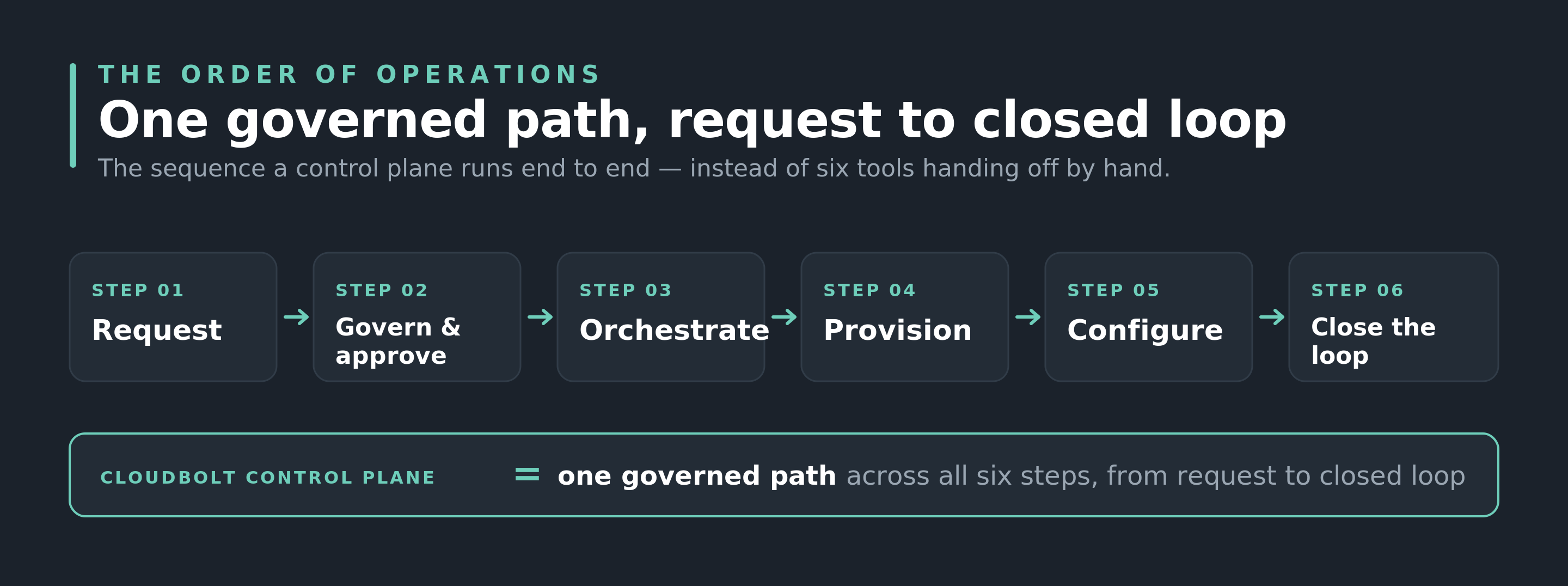
A control plane runs that whole sequence as one governed path, from request to closed loop. Without one, the handoffs between steps are manual, and the final step, closing the loop, is the one that quietly never happens. That is how orphaned resources and cost creep start, not from a single bad decision but from a sequence that no single system owns end to end.
That is how orphaned resources and cost creep start — not from a single bad decision but from a sequence that no single system owns end to end.
Signs your stack has outgrown its seams
You do not need a control plane because a vendor says so. You need one when the workflow stops being manageable by hand. A few signs it has crossed that line:
1. Provisioning one environment takes several tools and no single owner
Standing up a standard environment touches a portal or ticket, an approval step, an orchestration tool, one or more clouds or a hypervisor, and a configuration tool. If nobody owns that entire path end to end, the seams between the tools are where delays and errors live.
2. Governance lives in people rather than in the system
Approvals happen over chat, and whether something gets the right guardrails depends on someone remembering to ask first. That holds up until the person with the context is out, or until an auditor wants to see the policy enforced rather than described.
3. Every team and cloud does it a little differently
Each environment gets built its own way, so nothing is genuinely repeatable across the estate. Onboarding a new engineer or a new cloud means learning another local convention instead of following one pattern.
4. The loop rarely closes
Resources get created far more reliably than they get reclaimed. Without a step that tracks ownership and retires what is no longer needed, orphaned infrastructure and quiet cost creep become the default rather than the exception.
5. A migration or audit means re-plumbing, not reconfiguring
When a VMware move, a compliance requirement, or a new platform forces a change, you end up rewiring the workflow instead of adding a node to it. That is the clearest sign the workflow was never really a system to begin with.
One or two of these is normal for any growing environment. Four or five is the point where the seams are costing you more than any individual tool is saving you—you can map that tradeoff on your own stack in the builder.
Where CloudBolt fits
CloudBolt CMP is that control plane. It sits above the ITSM, CI/CD, cloud, VMware, and Kubernetes tools you already run, and takes a request through governance, orchestration, provisioning, configuration, and the close of the loop as one path, without asking you to rip out what already works.
The hard part is picturing where it slots into your specific stack. That is what the Interactive Cloud Architecture Builder is for. Select the platforms and tools you actually run, pick the scenario that matches you, whether that is a regulated environment, a VMware exit, or an MSP juggling multiple clouds, and it assembles your architecture with CloudBolt as the control plane and walks the full order of operations, from request to closed loop.
It is the fastest way to see whether a control plane earns its place in your environment, using your real stack rather than a generic diagram.
Map CloudBolt onto the stack you actually run
Build your architecture




Joanne Chu
Senior Content Marketing Manager
Related Blogs
Bringing Neoclouds to the Enterprise
Since I wrote about Meta renting out its spare GPU capacity back in July, neoclouds have steadily picked up pace…