What is Cloud Automation and Orchestration?
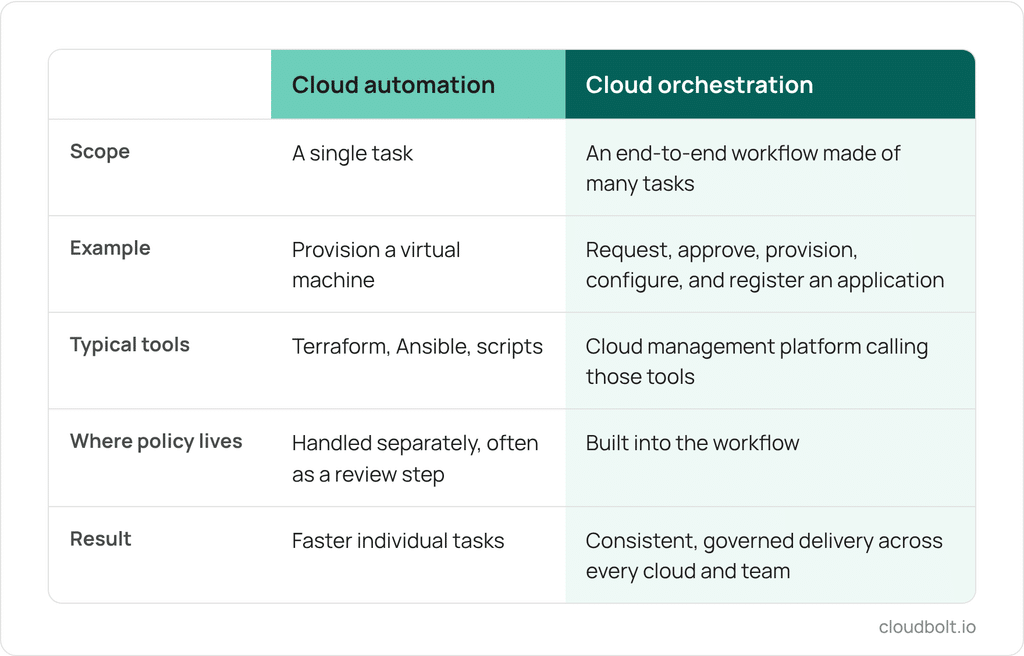
Cloud automation is the use of software, scripts, and workflows to complete individual tasks in a cloud environment, like provisioning a server or configuring a network, without manual work. Cloud orchestration coordinates many of those automated tasks into one end-to-end workflow that runs in the right order, with the approvals, policies, and handoffs your organization requires.
Most IT teams already have some automation in place. Terraform provisions infrastructure, Ansible handles configuration, and scripts cover much of the rest. The harder problem is getting every build to follow the same rules across every cloud, team, and environment. Orchestration is what ties those pieces together.
This guide explains how cloud automation and orchestration differ, the benefits of each, common use cases and challenges, and best practices for putting both to work.
What Is Cloud Automation?
Cloud automation refers to the use of software tools, scripts, and workflows to perform specific tasks within a cloud environment without manual work or intervention. These tasks can include provisioning servers, configuring networks, managing storage, and deploying applications. Infrastructure as code tools like Terraform and configuration management tools like Ansible are common examples. By automating routine processes, cloud automation enables IT teams to scale operations more efficiently, reduce errors, and free up time for higher-value work.
What Is Cloud Orchestration?
Cloud orchestration goes a step further by coordinating multiple automated tasks into comprehensive workflows that span environments, tools, and teams. Automation handles individual tasks. Orchestration arranges those tasks in the right sequence, applies the rules that govern them, and carries a request through to a finished, working result. You can think of automated tasks as the building blocks and orchestration as the process that assembles them.
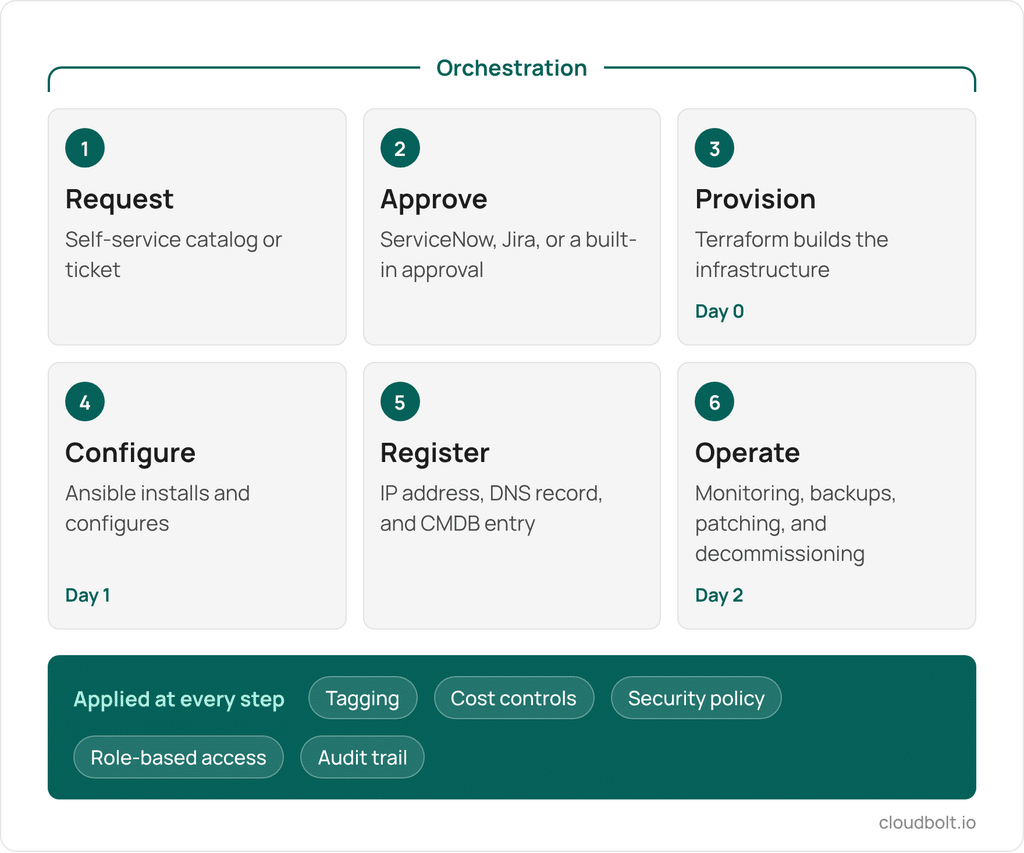
For example, deploying a multi-tier application across a hybrid cloud environment might involve provisioning servers with Terraform, configuring them with Ansible, routing an approval through ServiceNoe, requesting an IP address, registering DNS, creating the CMDB entry, and applying security and tagging policies. Each step can be automated on its own. Orchestration runs them as one governed workflow, so the application is built the same way every time, no matter which cloud or team it lands with.
Benefits of Cloud Automation and Orchestration
Cost reduction. Cloud automation lowers operational costs by streamlining processes like server provisioning, application deployment, and security management in IT infrastructure. Automated systems allocate resources dynamically, reducing underutilization without manual intervention. CloudBolt helped a major U.S. university automate resource provisioning across multiple environments and offer self-service access to IT resources, which reduced shadow IT and drove meaningful cost savings.
Scalability. Automation workflows allow cloud technology resources to be provisioned, adjusted, and decommissioned in response to real-time demand, preventing overprovisioning and reducing waste. Businesses can grow their cloud infrastructure alongside their needs without manual intervention or downtime. At the university, on-demand provisioning helped the IT team keep up with peak demand from faculty and students.
Speed of delivery. Automation turns tasks that took hours or days into minutes, so organizations can bring new services to market faster. Lobster Data, for example, cut manual work by 90 percent and now provisions six times faster, scaling its operations fivefold while adding only two engineers.
Consistency across environments. Cloud orchestration tools make sure automated tasks run in a coordinated way, in the right order, every time. Across several clouds, data centers, and teams, small differences in how each group builds things add up, and environments drift apart in ways nobody can fully explain. Orchestration encodes the approved way to build and operate a workload once, then repeats it wherever that workload runs.
Security. Orchestration makes sure security policies are applied the same way in every automated workflow. This reduces the risk of breaches while meeting regulatory requirements, without slowing delivery down.
Governance and compliance. Operating across multi-cloud environments brings governance and compliance challenges. When governance sits outside the delivery process as a review step, it tends to get skipped under deadline pressure. Orchestration builds tagging, cost controls, security policies, and approvals directly into each workflow, so every request follows company standards and regulatory requirements without a separate review. Because every action is logged, teams can produce audit evidence far faster than assembling it by hand from several systems.
Cloud Automation and Orchestration Use Cases
The combined power of cloud automation and orchestration is particularly evident in real-world applications, where they address complex challenges and improve operational efficiency across various scenarios.
Multi-Cloud Resource Management
In multi-cloud environments, organizations often need to manage resources across various platforms like AWS, Azure, and Google Cloud. Cloud automation simplifies resource provisioning, such as provisioning a virtual machine, while orchestration synchronizes workflows across platforms, balancing workloads and reducing downtime. An orchestration layer with unified visibility across multi-cloud environments helps businesses reduce the silos that arise in complex infrastructures.
CI/CD Pipelines
Continuous Integration and Continuous Deployment (CI/CD) pipelines rely heavily on automation to manage repetitive tasks like code deployment, testing, and integration. As these processes scale, orchestration becomes essential for managing the flow of code between development and production environments. Orchestration coordinates testing, feedback, and deployment steps to enable continuous delivery, streamline updates, and reduce errors.
Disaster Recovery
Disaster recovery and business continuity depend on efficient, automated processes. Automation helps by regularly backing up critical data and resources, while orchestration coordinates the recovery steps to minimize downtime. An orchestrated approach manages failover procedures, such as restoring data and rerouting traffic, so organizations can resume operations quickly after disruptions.
Moving off VMware
Many organizations are reducing their VMware footprint after Broadcom’s licensing changes. In CloudBolt’s February 2026 survey of 302 IT decision-makers at organizations with 1,000 or more employees, 86 percent said they are actively reducing their VMware footprint. Migration plans usually focus on moving workloads. The automation built around those workloads, including templates, scripts, approval paths, and CMDB integrations, often has to be rebuilt on the new platform. An orchestration layer that works across hypervisors and clouds lets teams keep their delivery process the same while the infrastructure underneath it changes.
Common Challenges in Cloud Automation
Implementing cloud automation and orchestration can significantly improve operational efficiency, but it also comes with its own set of challenges. Understanding them up front makes deployment and ongoing management much smoother.
Integrating Existing Infrastructure
Cloud automation often involves connecting existing on-promises infrastructure with modern cloud environments, and many different tools along the way, which requires integration across platforms. Older systems may not integrate easily with cloud-based tools, and tools that are not selected or configured carefully create compatibility issues that slow processes down. Choosing platforms with open integration capabilities, strong APIs, and support for the tools you already run, like Terraform and Ansible, helps avoid this.
Skill Gaps and Runbook Dependence
Cloud automation requires specialized knowledge, and there is often a shortage of qualified professionals who can implement and maintain these systems. A related problem is that critical processes often live in runbooks that only two or three people can execute correctly. Encoding those steps into orchestrated workflows turns individual knowledge into a repeatable standard, and upskilling existing teams helps close the rest of the gap.
Multi-Cloud Complexity and Visibility
Orchestrating workflows across multiple cloud environments requires managing dependencies between different systems and coordinating many software components. This complexity increases as the number of cloud platforms and services grows, and it becomes harder to track the progress of every workflow. Orchestration tools designed for multi-cloud environments, with built-in monitoring and audit trails, provide the visibility required so tasks are executed correctly and one time.
Security and Compliance Risks
Orchestrating tasks across different environments increases the risk of security breaches if not properly managed. Sensitive data moving between cloud platforms needs to be secured at all stages. Organizations must adopt security best practices such as encryption, secure APIs, and compliance monitoring to reduce risks. Building these controls into orchestrated workflows helps teams consistently meet governance policies and compliance requirements.
Best Practices for Implementing Cloud Automation and Orchestration
Implementing cloud automation and orchestration requires careful planning and a strategic approach. The following best practices help organizations adopt both with less risk and get more value from them.
Start Small and Scale
When introducing cloud automation and orchestration, it’s wise to start with simpler tasks, such as routine backups or simple server provisioning, before tackling more complex processes. This allows your team to test and refine its orchestration approach using automation tools in a controlled environment. A phased approach also means you do not have to reach a particular maturity level before you start. Most organizations have some processes fully automated and others still handled by hand. A good orchestration approach picks up each process where it is today, wraps it in consistent governance, and lets you expand automation incrementally as the team gains confidence.
Investing in training and defining clear roles and responsibilities keeps automation workflows running smoothly as they grow. Mapping out existing workflows first shows where automation will help most.
Select the Right Tools
Choosing the right tools is crucial for successful cloud automation and orchestration. Look for platforms that work with the infrastructure and automation you already have rather than replacing it, provide robust APIs, and scale with your organization’s needs. Avoid tools that lock you into a single cloud or vendor ecosystem, so your delivery process can stay the same if your infrastructure choices change. It is also worth asking what happens when a tool does not support something you need. Can your team extend it, or do you have to wait on the vendor’s roadmap?
Implement Full Lifecycle Automation
To fully realize the benefits of cloud automation and orchestration, businesses should aim to implement full lifecycle automation. This approach automates the entire cloud resource lifecycle, from initial provisioning to ongoing management and eventual decommissioning, incorporating essential infrastructure management practices. Lifestyle automation also covers day-two operations, the work that happens after a resource is running. Patching, backups, certificate rotation, resizing, and expiration policies can be built into the same workflow that provisioned the resource, so they happen on schedule instead of depending on someone remembering a runbook. With full lifecycle automation, teams get continuous, efficient cloud management and can focus on strategic initiatives rather than routine tasks.
Align Automation with Real Business Outcomes and Financial Metrics
Cloud automation should be measured by business results, not just operational activity. Setting clear goals up front, such as cost savings, faster delivery times, or improved resource utilization, lets teams show what automation is actually returning to the business in real time.
Cost is a good example. Many teams only see overspend after the bill arrives. Orchestration lets you enforce budgets at the moment of the request, with cost estimates shown before submission and over-budget requests blocked or escalated for approval. Tracking FinOps metrics, like cloud spend per team or per service, then shows where automation delivers the highest return and where to refine it.
Common Cloud Automation and Orchestration Tools
Most organizations use several tools that each handle part of automation and orchestration. Each does a specific job well, and they work best together.
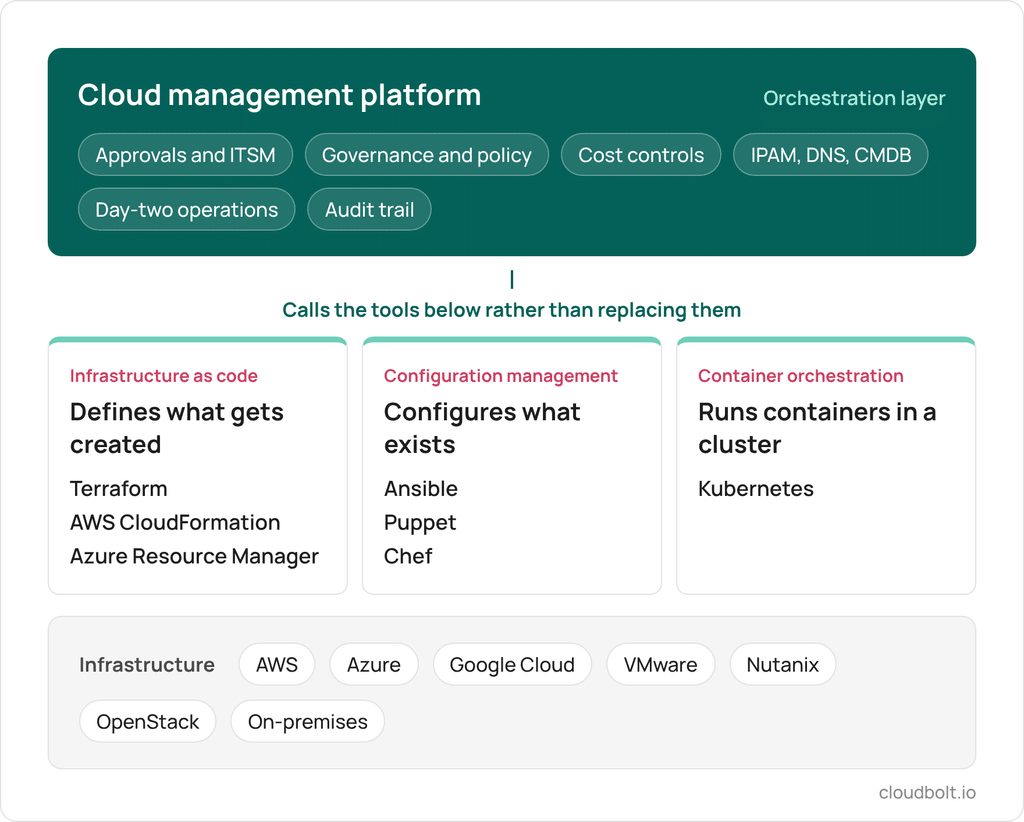
Terraform defines and provisions infrastructure across cloud providers using a declarative configuration language, which keeps resource definitions consistent and repeatable. AWS CloudFormation and Azure Resource Manager (ARM) templates do the same within their own clouds. These infrastructure as code tools define what gets created.
Ansible can provision some resources, but its real strength is configuration management. It installs software, applies settings, and keeps servers in the desired state once they exist. Puppet and Chef fill a similar role in many environments.
Kubernetes is the industry standard for container orchestration. It automates the deployment, scaling, and management of containerized applications across clusters. Container orchestration is a narrower use of the word. It coordinates containers inside a cluster rather than workflows across an organization’s clouds, tools, and teams.
Cloud management platforms sit above all of these as an orchestration layer. Terraform’s self-service covers Terraform, and Ansible’s covers Ansible. Neither one, on its own, hands a developer a complete production build that includes approvals, ITSM tickets, IP addresses, DNS records, CMDB entries, cost controls, and day-two operations. A cloud management platform calls Terraform and Ansible underneath rather than replacing them, and adds the governance and workflow logic that connects everything into one process.
Cloud Automation and Orchestration with CloudBolt CMP
CloudBolt CMP is a hybrid and multi-cloud orchestration platform for teams that already have automation and need it to work the same way everywhere. It connects to AWS, Azure, Google Cloud, VMware, Nutanix, OpenStack, and other environments, and calls the Terraform and Ansible automation you already have rather than replacing it.
Blueprints in CMP define not only what gets deployed, but how. Each blueprint carries the approval chain, cost controls, tagging policy, security requirements, and post-deployment actions, so governance is built into every request instead of added as a review step. Approvals route through ServiceNow, Jira Service Management, or built-in workflows, and CMDB, IPAM, and DNS registration happen inside the same workflow. Because CMP is built on Python, teams can extend it to match how their organization works rather than waiting on a vendor roadmap.
CMP also supports the Model Context Protocol (MCP), so AI agents can take cloud actions through the same permissions, approvals, and guardrails your team already uses.
You can try CloudBolt CMP free on your own environment, with no sales conversation required.
Frequently Asked Questions (FAQs)
What is the difference between cloud automation and cloud orchestration?
Cloud automation is the process of using software tools and scripts to perform repetitive tasks within a cloud environment, such as provisioning servers or deploying applications, without requiring manual intervention. It streamlines individual tasks. Cloud orchestration coordinates multiple automated tasks into unified workflows. For instance, orchestration makes sure tasks like provisioning, approvals, security checks, and load balancing happen in the correct sequence, so complex processes like multi-tier application deployment run consistently across hybrid or multi-cloud environments.
Why are cloud automation and orchestration important?
Cloud automation and orchestration reduce manual work, cut errors, and make cloud delivery faster and more consistent. Automation handles repetitive tasks like provisioning and configuration in IT operations. Orchestration makes those tasks run together in the right order, with the approvals and policies the business requires. Together, they help businesses optimize resource usage, reduce costs, and adapt quickly to changes in demand. For example, e-commerce companies can dynamically adjust their resources to handle high traffic during sales events, minimizing downtime.
Can cloud automation reduce operational costs?
Yes, cloud automation significantly reduces operational costs by optimizing resource allocation, minimizing manual effort, and lowering the likelihood of errors. For example, automated scaling makes sure resources are provisioned only when needed, avoiding overprovisioning. Orchestration adds another layer by enforcing budgets at the time of the request, before spend happens. By aligning resource usage with real-time requirements, businesses can achieve substantial cost savings while maintaining performance.
How does AI enhance cloud automation and orchestration?
AI is changing both how automation works and who triggers it. Machine learning can analyze historical usage patterns to predict demand and adjust resources, and AI agents are starting to take infrastructure actions directly through natural language requests. That second change raises a governance question, because an agent acting on cloud infrastructure needs the same permissions, approvals, and audit trail a person would. Standards like the Model Context Protocol (MCP) let orchestration platforms give AI agents access to infrastructure through a governed layer, so automation gets faster without bypassing existing controls.
How can CloudBolt help with cloud automation and orchestration?
CloudBolt CMP orchestrates cloud automation across public cloud, private cloud, and on-premises environments. It works on top of the tools teams already use, including Terraform, Ansible, and ServiceNow, and builds approvals, cost controls, tagging, and security policies into every request. Teams get consistent, governed delivery across every environment without rewriting the automation they already have. CMP offers a free tier, so you can try it on your own environment before making any commitment.



Joanne Chu
Senior Content Marketing Manager
Related Blogs
AI Agent Governance – Five Questions to Ask
Infrastructure teams are already running AI agents against their cloud and on-prem environments. For every change an agent makes, teams…