Unlike other managed Kubernetes platforms, Azure Kubernetes Service (AKS) offers a Free tier with no control-plane costs, so your baseline expenses focus on the worker nodes running your applications. Even though targeted AKS cost optimization strategies can achieve 40-60% cost reductions, AKS pricing complexity makes it difficult for administrators to identify when and where expenses accumulate.
This article explains practical approaches for node pool management, storage optimization, and automated rightsizing that address the unique cost challenges of running Kubernetes workloads on Azure, covering both pricing model complexities and configuration challenges.
Summary of key AKS cost optimization concepts
| Concept | Description |
|---|---|
| AKS pricing components | AKS costs include cluster management fees (free for the basic tier), node pool virtual machines, Azure Load Balancer usage, and storage volumes. Understanding these components helps identify optimization opportunities specific to Azure’s billing structure. |
| Azure VM sizing and selection strategies | Choose appropriate VM families (D-series for general workloads, F-series for CPU-intensive tasks) and leverage Azure’s rightsizing recommendations. Use Spot VMs for fault-tolerant workloads to achieve 60-90% cost savings compared to pay-as-you-go pricing. |
| Node pool optimization | Configure multiple node pools with different VM types to match workload requirements. Use system and user node pool separation, implement node auto-scaling, and leverage Azure’s availability zones for cost-effective high availability. |
| Azure-native autoscaling | Combine Cluster Autoscaler with Virtual Node integration (Azure Container Instances) for burst workloads. Configure Horizontal Pod Autoscaler with Azure Monitor metrics for application-aware scaling decisions. |
| Storage cost management | Optimize persistent volume claims by selecting appropriate storage classes (Standard vs Premium SSD). Implement lifecycle policies for Azure Blob Storage integration and use Azure Files only when necessary due to higher costs. |
| Network cost optimization | Minimize data transfer costs through strategic resource placement within Azure regions. Configure Azure Load Balancer efficiently and optimize ingress controller selection to reduce networking overhead. |
| Resource rightsizing techniques | Set accurate CPU and memory requests/limits based on Azure VM capacity planning. Use Azure Monitor Container insights to identify over-provisioned resources and implement continuous rightsizing for optimal VM utilization. |
AKS pricing model and cost drivers
Azure Kubernetes Service follows a distinct pricing approach compared to other managed Kubernetes offerings. The AKS control plane operates at no charge, but you pay for the underlying Azure infrastructure that powers your workloads.
The primary cost components are virtual machines for worker nodes, which typically represent 70-80% of total cluster expenses. These compute instances run your containerized applications, and costs depend on VM size, family, and runtime duration.
Azure Load Balancer costs also accumulate through monthly fees and data processing charges, with the Standard Load Balancer required for production AKS clusters.
Storage costs arise from persistent volumes using Azure Disk or Azure Files, billed on provisioned capacity and IOPS requirements.
Network data transfer between Azure regions or to external destinations adds additional costs, particularly impacting multi-region deployments or applications with significant external API interactions.
CloudBolt delivers continuous Kubernetes rightsizing at scale—so you eliminate overprovisioning, avoid SLO risks, and keep clusters efficient across environments.
Azure VM sizing and selection strategies
Azure offers specialized VM families optimized for different workload characteristics, each with distinct pricing structures.
| VM Series | Description | Suitable For |
|---|---|---|
| D-series | Balanced compute-to-memory ratios. | General-purpose applications |
| F-series | Higher CPU-to-memory ratios. | CPU-intensive workloads such as web servers or batch processing jobs |
| E-series | Higher memory-to-CPU ratios | Memory-intensive applications, such as databases or in-memory analytics |
Understanding these families helps match infrastructure costs to actual workload requirements rather than defaulting to general-purpose instances that may be oversized for specific use cases.
# Example node pool configurations for different VM families
# General purpose - balanced compute/memory ratio
az aks nodepool add \
  --resource-group myResourceGroup \
  --cluster-name myAKSCluster \
  --name generalpool \
  --node-count 3 \
  --node-vm-size Standard_D4s_v3  # 4 vCPU, 16GB RAM

# CPU optimized - higher CPU-to-memory ratio
az aks nodepool add \
  --resource-group myResourceGroup \
  --cluster-name myAKSCluster \
  --name cpupool \
  --node-count 3 \
  --node-vm-size Standard_F8s_v2  # 8 vCPU, 16GB RAM

# Memory optimized - higher memory-to-CPU ratio
az aks nodepool add \
  --resource-group myResourceGroup \
  --cluster-name myAKSCluster \
  --name mempool \
  --node-count 3 \
  --node-vm-size Standard_E4s_v3  # 4 vCPU, 32GB RAM
VM size optimization
Right-size Azure VMs based on actual cluster utilization rather than initial capacity estimates. Monitor node-level resource consumption to identify consistently over-provisioned or under-provisioned node pools.
# Analyze current node pool utilization
kubectl top nodes
kubectl describe nodes | grep -A 5 "Allocated resources"

# Scale node pools based on utilization patterns
az aks nodepool scale \
  --resource-group myResourceGroup \
  --cluster-name myAKSCluster \
  --name apppool \
  --node-count 3
Consider both peak and baseline utilization when sizing node pools to provide sufficient capacity for traffic spikes. This will also help avoid excessive idle resources during normal operations.
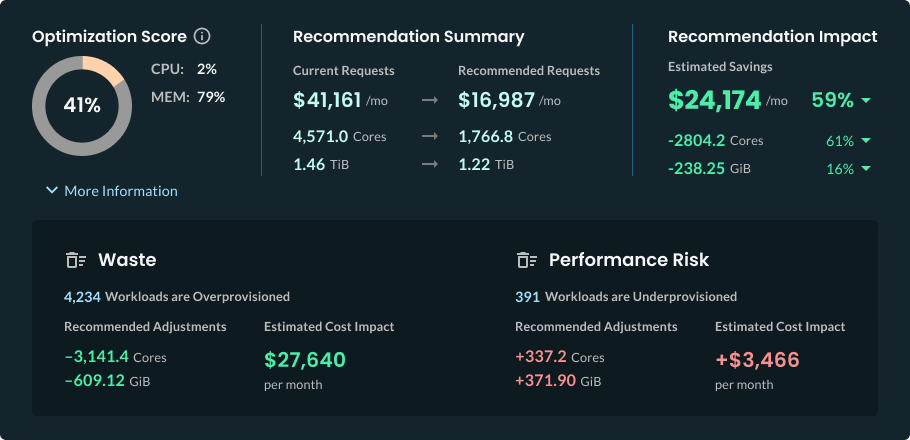
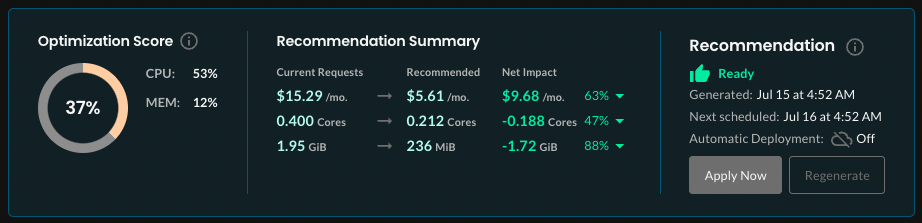
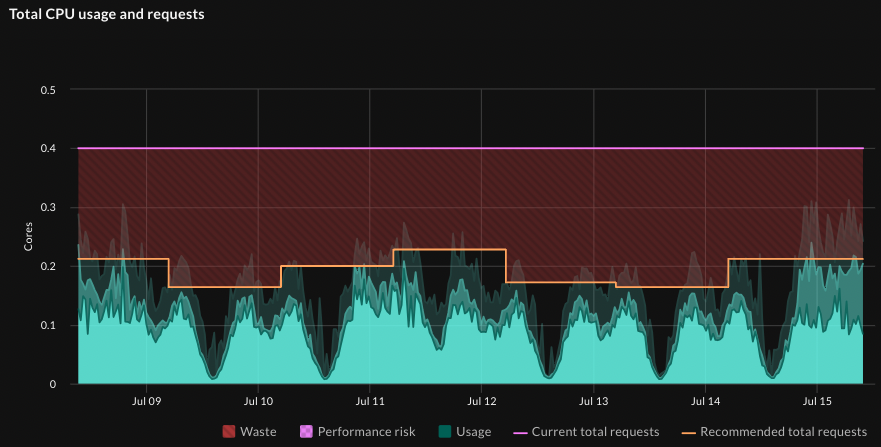
In addition to node pool rightsizing, Kubernetes administrators typically face challenges with effectively managing limits and requests, which requires continuous manual monitoring and tuning. In contrast, CloudBolt’s StormForge Optimize Live right-sizes pods automatically, using machine learning to analyze usage data from workloads and recommend the most efficient CPU and memory settings without compromising performance or reliability.
Recommendations can be automatically implemented to keep pods continuously rightsized as usage fluctuates. As a result, it helps achieve substantial financial savings for multi-cluster Kubernetes environments, as displayed in the following screenshot.
Azure Spot VMs and Reserved Instances
Azure Spot VMs provide substantial cost savings for fault-tolerant workloads by utilizing Azure’s spare compute capacity at up to 90% discounts compared to pay-as-you-go pricing. Spot instances work particularly well for:
- Development environment
- Batch processing
- Stateless applications that can gracefully handle interruptions.
Implement pod disruption budgets and node affinity configurations to ensure critical workloads avoid Spot instances while development and testing environments benefit from the cost savings. You can configure applications to handle Spot evictions through graceful shutdown procedures and state persistence strategies.
# Create spot node pool with significant cost savings
az aks nodepool add \
  --resource-group myResourceGroup \
  --cluster-name myAKSCluster \
  --name spotpool \
  --node-vm-size Standard_D4s_v3 \
  --priority Spot \
  --eviction-policy Delete \
  --spot-max-price 0.5 \
  --enable-cluster-autoscaler \
  --min-count 0 \
  --max-count 20
Azure Reserved Instances provide 30-70% cost savings for predictable workloads with 1-year or 3-year capacity commitments. Plan reserved capacity based on baseline cluster requirements identified through 3-6 months of usage data:
# Purchase reserved instances for stable node pools
az reservations reservation-order purchase \
  --reserved-resource-type VirtualMachines \
  --sku Standard_D4s_v3 \
  --location eastus \
  --quantity 5 \
  --term P1Y \
  --billing-scope-type Shared
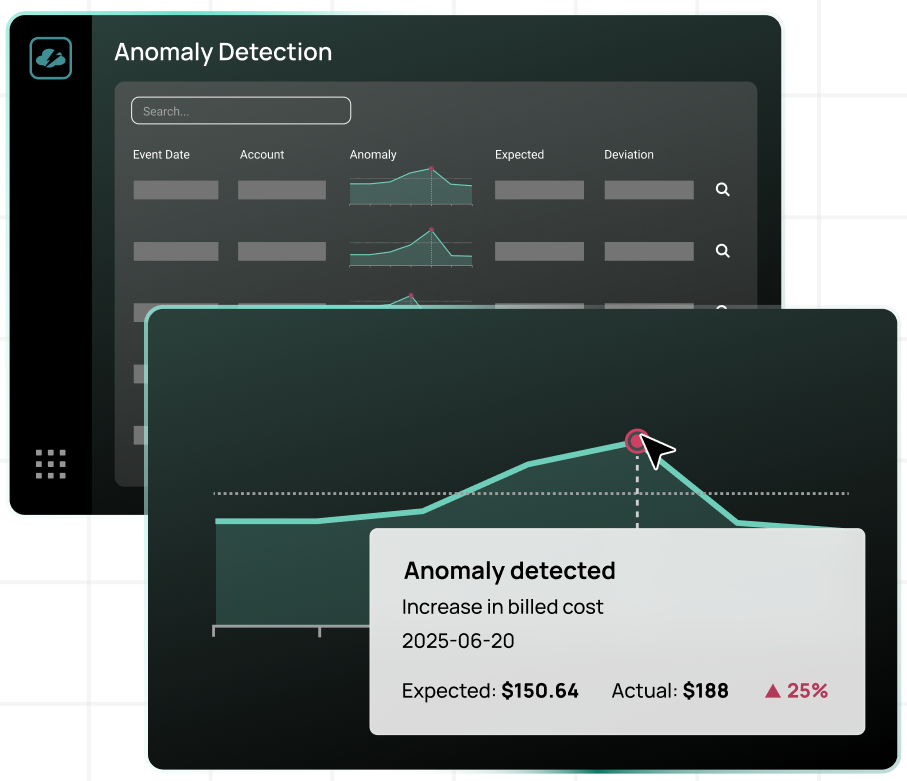
Focus reserved instance purchases on system node pools and baseline application capacity that remains consistent regardless of traffic patterns.While spot instances are a powerful tool for strategic cost reduction, maintaining the balance between spot and on-demand formats requires a substantial amount of overhead for cloud cost optimization specialists. At the same time, CloudBolt’s Anomaly Detection mechanism helps streamline this process by automating monitoring and automation for cost anomalies or repeatable patterns related to instance types. Under the hood, AI continuously learns about your environment, flags unusual spikes in real-time, and can trigger automated responses that can be configured as custom actions.
Hybrid architecture strategies
Combine reserved instances with Spot VMs for optimal cost efficiency across different workload types:
- Reserved instances for system workloads ensure an always-available infrastructure for essential cluster components and baseline application capacity.
- Spot instances for elastic application workloads provide cost-effective scaling capacity for variable demand scenarios.
- Pay-as-you-go instances for critical burst capacity handle unexpected traffic spikes when Spot capacity is unavailable.
This hybrid approach maintains cluster stability while maximizing cost savings through appropriate instance type selection for each workload category.
This practical FinOps playbook shows you exactly how to build visibility, enforce accountability, and automate rightsizing from day one.
Node pool optimization strategies
AKS supports multiple node pools within a single cluster, enabling cost optimization by matching VM types to specific workload requirements. This architecture avoids the common anti-pattern of sizing all nodes for the most resource-intensive applications, leading to waste across less demanding workloads.
Specialized node pools for different workload categories include:
- System node pools run essential Kubernetes components like CoreDNS, metrics-server, and tunnelfront on smaller, always-available instances.
- User node pools handle application workloads and can scale dynamically in response to demand, reducing costs during low traffic periods.
Here’s how to create them.
# System node pool for critical cluster components
az aks nodepool add \
  --resource-group myResourceGroup \
  --cluster-name myAKSCluster \
  --name systempool \
  --node-count 3 \
  --node-vm-size Standard_D2s_v3 \
  --mode System

# User node pool for application workloads
az aks nodepool add \
  --resource-group myResourceGroup \
  --cluster-name myAKSCluster \
  --name apppool \
  --node-count 2 \
  --node-vm-size Standard_D4s_v3 \
  --mode User \
  --enable-cluster-autoscaler \
  --min-count 1 \
  --max-count 10
Availability zone cost considerations
Azure availability zones provide redundancy but impact costs through cross-zone data transfer charges. Balance high availability requirements with cost considerations by using preferred rather than required pod anti-affinity:
# Pod anti-affinity to spread across zones cost-effectively
affinity:
  podAntiAffinity:
    preferredDuringSchedulingIgnoredDuringExecution:
    - weight: 100
      podAffinityTerm:
        labelSelector:
          matchExpressions:
          - key: app
            operator: In
            values:
            - critical-service
        topologyKey: topology.kubernetes.io/zone
This configuration spreads pods across zones when possible but allows cost optimization when zone capacity becomes limited or expensive.
Azure-native autoscaling
Configure Cluster Autoscaler with Azure-specific parameters to optimize both performance and costs. The autoscaler monitors pod scheduling failures and node utilization to make scaling decisions that balance responsiveness with cost efficiency.
# Cluster autoscaler ConfigMap optimization
apiVersion: v1
kind: ConfigMap
metadata:
  name: cluster-autoscaler-status
  namespace: kube-system
data:
  scale-down-delay-after-add: "10m"
  scale-down-unneeded-time: "10m"
  scale-down-utilization-threshold: "0.5"
  skip-nodes-with-local-storage: "false"
  skip-nodes-with-system-pods: "false"
The settings above allow faster scale-down when resources become available. The 50% utilization threshold facilitates nodes to be removed when they’re underutilized. Additionally, the 10-minute delays prevent thrashing during traffic fluctuations.
Virtual Nodes and Azure Container Instances
Azure Virtual Nodes pricing is based only on the actual container runtime, making them cost-effective for burst scenarios. They provide serverless container execution through Azure Container Instances (ACI) integration, eliminating the need for persistent node pools for unpredictable workloads.
# Enable Virtual Nodes for burst capacity
az aks enable-addons \
  --resource-group myResourceGroup \
  --cluster-name myAKSCluster \
  --addons virtual-node \
  --subnet-name myAKSSubnet
Deploy burst workloads to Virtual Nodes using specific node selectors:
# Deploy burst workload to Virtual Nodes
apiVersion: apps/v1
kind: Deployment
metadata:
  name: burst-workload
spec:
  replicas: 50
  template:
    spec:
      nodeSelector:
        kubernetes.io/role: agent
        beta.kubernetes.io/os: linux
        type: virtual-kubelet
      tolerations:
      - key: virtual-kubelet.io/provider
        operator: Exists
Virtual Nodes work particularly well for CI/CD pipelines, batch processing, and event-driven workloads where timing is unpredictable but resource requirements are well-defined.
In most cases, Kubernetes deployments require constant fine-tuning of CPU and memory allocation to ensure they are distributed appropriately between worker nodes. This is precisely where ClouBolt’s StormForge platform comes to the scene to implement automated recommendations and triggers to apply them

You can learn more about ML-powered capabilities using StormForge’s Sandbox environment.
Storage cost management
Choose appropriate Azure storage classes based on performance requirements and cost tolerance. Standard SSD provides adequate performance for most applications at 60-70% lower cost than Premium SSD, while Standard HDD offers the lowest cost for archival or backup scenarios.
# Cost-optimized storage class configurations
apiVersion: storage.k8s.io/v1
kind: StorageClass
metadata:
  name: managed-standard-ssd
provisioner: kubernetes.io/azure-disk
parameters:
  storageaccounttype: StandardSSD_LRS
  kind: Managed
reclaimPolicy: Delete
allowVolumeExpansion: true
---
apiVersion: storage.k8s.io/v1
kind: StorageClass
metadata:
  name: managed-premium-ssd
provisioner: kubernetes.io/azure-disk
parameters:
  storageaccounttype: Premium_LRS
  kind: Managed
reclaimPolicy: Delete
allowVolumeExpansion: true
Reserve Premium SSD for applications requiring high IOPS or low latency, such as databases or real-time analytics platforms. Use Standard SSD for application data, logs, and development environments.
Azure Files vs. Azure Disk optimization
Azure Files costs are based on both storage capacity and transaction volume, making it significantly more expensive than Azure Disk for most Kubernetes workloads. Reserve Azure Files for scenarios requiring ReadWriteMany access patterns:
# Use Azure Disk for single-pod storage requirements
apiVersion: v1
kind: PersistentVolumeClaim
metadata:
  name: app-storage
spec:
  accessModes:
  - ReadWriteOnce
  storageClassName: managed-standard-ssd
  resources:
    requests:
      storage: 10Gi
---
# Reserve Azure Files only for multi-pod shared storage
apiVersion: v1
kind: PersistentVolumeClaim
metadata:
  name: shared-storage
spec:
  accessModes:
  - ReadWriteMany
  storageClassName: azurefile
  resources:
    requests:
      storage: 5Gi
For shared configuration or static assets, consider alternatives like ConfigMaps or init containers that copy data from Azure Blob Storage rather than maintaining persistent Azure Files volumes.
Network cost optimization
Network costs depend on ingress controllers and your data transfer costs.
Ingress controller selection
Different ingress controllers have varying Azure integration costs and performance characteristics. Application Gateway Ingress Controller (AGIC) integrates natively with Azure Application Gateway but adds gateway costs to your cluster:
# AGIC configuration with cost considerations
apiVersion: v1
kind: ConfigMap
metadata:
  name: appgw-config
data:
  appgw.shared: "true"  # Share gateway across multiple clusters
  appgw.usePrivateIP: "false"
NGINX Ingress Controller runs on cluster nodes and uses Azure Load Balancer, typically resulting in lower networking costs for high-traffic scenarios:
# Install NGINX with Azure Load Balancer integration
helm install nginx-ingress ingress-nginx/ingress-nginx \
  --set controller.service.loadBalancerIP=<STATIC_IP> \
  --set controller.service.annotations."service\.beta\.kubernetes\.io/azure-load-balancer-resource-group"=<RG_NAME>
AGIC provides deeper Azure integration and advanced features like SSL termination at the gateway level, while NGINX offers more flexibility and lower costs for straightforward load balancing scenarios.
Data transfer cost minimization
Minimize cross-region data transfer costs through strategic resource placement and network topology design. Placing frequently communicating services on the same nodes reduces intra-region network charges for high-volume data exchange patterns. Configure node affinity to keep related services within the same Azure region, as shown:
# Node affinity to keep related services in the same region
affinity:
  nodeAffinity:
    requiredDuringSchedulingIgnoredDuringExecution:
      nodeSelectorTerms:
      - matchExpressions:
        - key: topology.kubernetes.io/region
          operator: In
          values:
          - eastus
Resource rightsizing techniques
Leverage Azure Monitor Container insights to identify optimization opportunities through detailed utilization analysis. Pod-level CPU and memory metrics reveal over-provisioned or under-provisioned resources.
# Query Container insights for resource utilization patterns
az monitor log-analytics query \
  --workspace myWorkspace \
  --analytics-query "
    Perf
    | where TimeGenerated > ago(7d)
    | where ObjectName == 'K8SContainer'
    | where CounterName == 'cpuUsageNanoCores'
    | summarize avg(CounterValue), max(CounterValue) by Computer, InstanceName
  "
Analyze these metrics over 2-4 week periods to identify consistent patterns and account for traffic variations before making resource adjustments.
Automated rightsizing approaches
Traditional monitoring tools provide utilization data but require manual analysis and implementation of resource specification changes. Manual resource optimization becomes impractical as clusters grow beyond 20 to 30 applications.
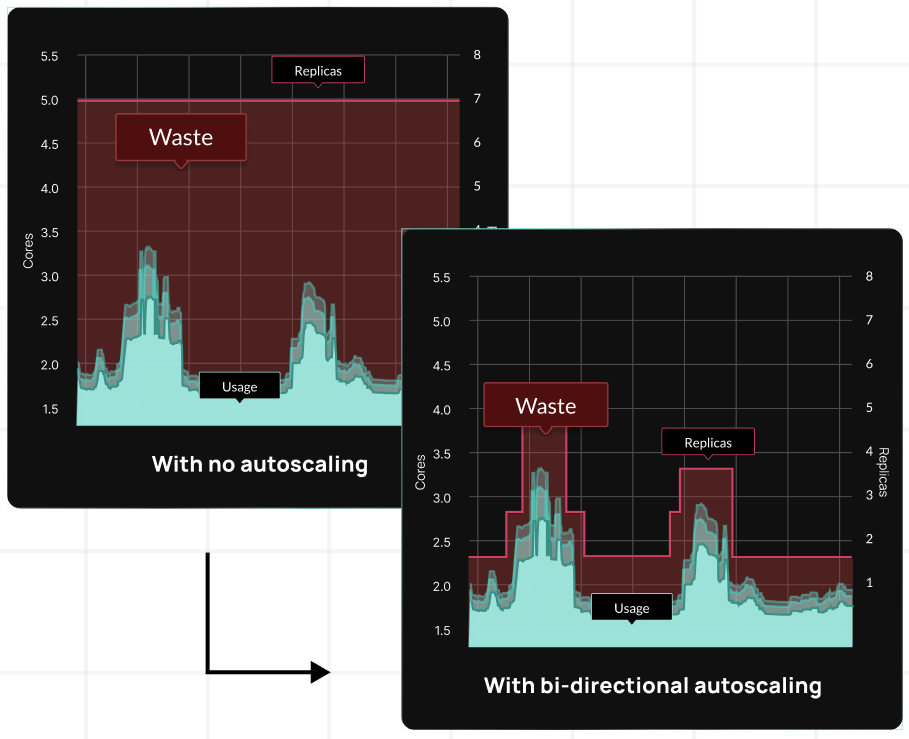
Modern automated rightsizing platforms address these scalability challenges by analyzing historical utilization patterns and implementing optimized resource settings without manual intervention. These systems continuously adjust CPU and memory requests based on actual workload behaviour.
Implementing machine learning-driven optimization for AKS environments automatically tunes resource allocation across node pools, accounting for Azure VM pricing tiers and availability patterns. This approach typically reduces Azure compute costs by 30-50% without sacrificing performance.
For reference, CloudBolt’s StormForge platform implements bi-directional autoscaling, leveraging AI/ML capabilities for sophisticated rightsizing.
Cost monitoring and governance
Implement cost monitoring specific to AKS resources through Azure Cost Management APIs and dashboards. Set up cost allocation tags to track expenses by team, project, or environment:
# Standard labels for cost tracking
metadata:
  labels:
    cost-center: "engineering"
    project: "frontend-api"
    environment: "production"
    team: "platform"
    owner: "john.doe@company.com"
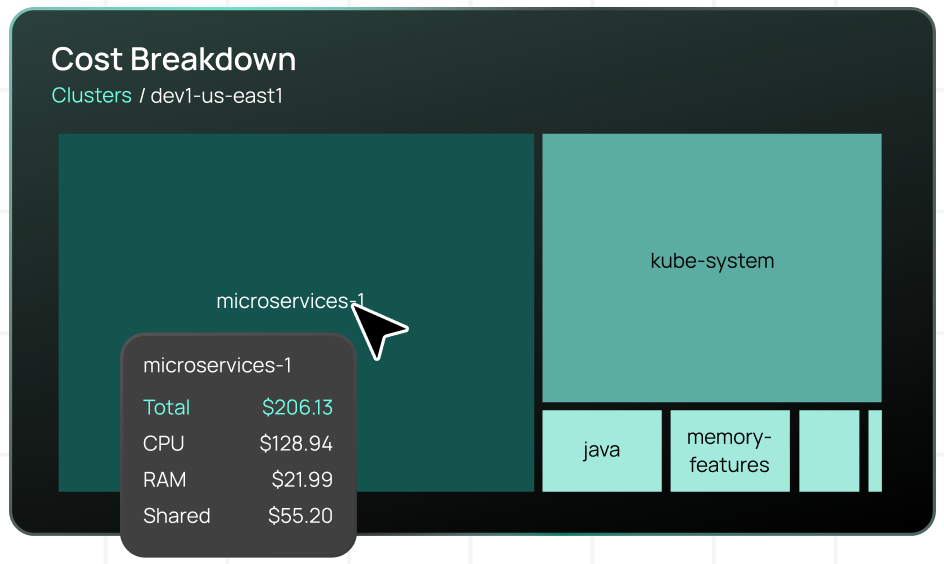
Configure Azure budgets and alerts for cluster cost thresholds to prevent unexpected charges and enable proactive cost management.While Azure Cost Management provides infrastructure-level visibility, Kubernetes environments require granular cost allocation down to the namespace, application, and team level. CloudBolt’s Kubernetes cost allocation capabilities provide this detailed breakdown, showing exactly how CPU, memory, and shared infrastructure costs distribute across workloads.
Resource governance policies
Establish policies for resource requests and limits, node pool management, and storage provisioning. To prevent uncontrolled cost growth, create approval workflows for expensive resources like Premium SSD storage or large VM instances.
Train development teams on cost-conscious Kubernetes practices and provide regular feedback on resource utilization patterns through automated reporting and team dashboards.
AKS cost optimization best practices
Some more recommendations are given below.
Implement continuous optimization processes
Establish automated monitoring and adjustment processes rather than relying on one-time optimization efforts. AKS costs fluctuate based on application usage patterns, Azure pricing changes, and seasonal demand variations.
Regular optimization activities include:
- Monthly node pool right-sizing reviews
- Quarterly reserved instance capacity planning
- Continuous monitoring of Spot VM availability for cost-sensitive workloads.
Balance cost optimization with operational complexity
Avoid extreme manual cost optimization measures that compromise application reliability or increase operational overhead. Maintain adequate resource buffers to handle traffic spikes, and implement comprehensive monitoring before implementing aggressive downsizing strategies.
Consider the total cost of ownership, including operational effort required to manually manage complex, highly optimized configurations versus simplified setups with moderate cost savings.
Monitor optimization impact over time
Track both cost savings and application performance metrics after implementing optimization changes. Without tools that analyze both cost and performance metrics simultaneously, manual optimizations may reduce infrastructure costs while inadvertently impacting user experience or system reliability.
Maintain baseline performance metrics and cost tracking to measure optimization effectiveness and identify areas requiring adjustment as workloads and usage patterns evolve.
The airline analogy translates complex cluster economics into language your execs, engineers, and FinOps teams can all understand.
Conclusion
AKS cost optimization requires a holistic approach that combines Azure’s unique pricing advantages with careful attention to hidden cost drivers. These techniques work together as an integrated cost management strategy rather than isolated optimizations.
Start with foundational decisions, such as selecting the appropriate VM family and using ephemeral OS disks, then build the node pool architecture to avoid both under-optimization and excessive complexity. Layer on storage optimizations that balance performance with cost, while accounting for bursting limits and zone redundancy requirements. Implement network cost controls by strategically managing egress and selecting ingress controllers.
The key to sustainable cost optimization lies in automation and continuous monitoring. Manual optimization efforts plateau quickly as cluster complexity grows, making automated rightsizing and intelligent workload placement essential for long-term cost control. Combined with strategic use of Savings Plans, Spot VMs, and Azure-native monitoring, these approaches create a cost-efficient infrastructure that scales with your organization’s needs without sacrificing the performance and reliability that applications require.


Related Blogs
Why Cloud Resource Optimization Is Moving Beyond Recommendations
Cloud resource optimization has typically followed this pattern: teams identify inefficiencies, generate recommendations, review them, and apply changes where it feels safe to…