Acquisitions, team preferences, and provider-specific capabilities gradually push workloads across different clouds in most organizations. What starts as two cloud accounts becomes five, then ten, then an environment sprawl that nobody has full visibility into.
Native cloud tools are built to manage a single provider’s resources, not coordinate across several. AWS Cost Explorer cannot tell you what you’re spending on Azure. Azure Policy does not know about your GCP IAM configuration. The more environments you add, the harder it becomes to enforce consistent governance, track spending accurately, or provision infrastructure without maintaining three separate workflows.
Multi-cloud management platforms (CMPs) provide a single control plane for provisioning, governance, cost management, and automation, regardless of where workloads run. This article explores the corex capabilities to consider when evaluating one.
Summary of key capabilities of multi-cloud management platforms
| Capability | Description |
| Unified provisioning & orchestration | Deploy and manage VMs, containers, and services across clouds from a single interface. |
| Cost management & FinOps | Track, allocate, and optimize spending across providers with consolidated dashboards and chargeback reporting. |
| Governance & policy enforcement | Apply consistent security, access control, and compliance rules across all cloud environments. |
| Self-service catalogs | Instrument teams to provision pre-approved, compliant resources without IT tickets. |
| Monitoring & observability | Aggregate performance metrics and alerts from all environments into one view. |
| Automation & IaC integration | Orchestrate provisioning and Day 2 operations through Terraform, Ansible, and CI/CD pipelines. |


Customizable guardrails to embed governance policies when provisioning workloads

Self-service catalogs to provision compliant, cost-efficient resources in private and public clouds

Accountable FinOps workflows with task assignment, chargeback reports, and scorecards
Why organizations need multi-cloud management platforms
Most teams adopt a multi-cloud management platform because a specific operational problem becomes impossible to ignore. The triggers vary, but they tend to cluster around the same set of pain points.
Workloads across multiple public cloud providers
Once you have meaningful workloads on two or more clouds, the coordination overhead begins. Each provider has its own provisioning model, IAM system, billing format, and monitoring stack. Managing these in parallel is workable at a small scale. However, on a larger scale, the inconsistencies between them compound into real operational risk.
Hybrid environments mixing cloud and on-prem
Cloud-only teams can get by with native tools longer than hybrid teams can. When on-prem infrastructure is part of the picture, the gap becomes obvious immediately. There is no native AWS or Azure tool that understands your VMware environment, and no VMware tool that understands what’s running in GCP.
Provisioning bottlenecks from ticket-based workflows
When every infrastructure request goes through a ticket queue, platform teams spend most of their time on provisioning rather than on platform work. Engineering velocity slows down, and the backlog grows faster than the team can clear it.
Inconsistent governance across environments
Different providers and IAM models result in different policy enforcement mechanisms. In practice, most multi-cloud teams maintain separate governance frameworks per provider. Configuration drift between them is not an edge case; it is the default outcome when there is no unified enforcement layer.
Poor visibility into ownership and cost
Billing data from AWS, Azure, and GCP arrives in different formats with different tag schemas. Without a normalization layer, answering a question like “how much did the payments team spend last month across all clouds?” requires custom pipeline work and manual reconciliation. The result is always late and often incomplete.
Infrastructure sprawls across teams
As organizations grow, cloud resources accumulate across teams with no central inventory. Orphaned VMs, untagged resources, and forgotten dev environments all contribute to spending that nobody owns or monitors.
Multi-cloud management platform capabilities
These problems do not stay isolated. Poor tagging makes cost allocation unreliable. Unreliable cost data makes budget enforcement harder. Inconsistent governance creates shadow IT conditions. A multi-cloud management platform addresses all of them through a single control plane rather than requiring a separate tool for each. Here are the capabilities to look for when choosing your platform.
#1 Unified provisioning and orchestration
Provisioning a VM on AWS, Azure, and on-prem through VMware is three completely different workflows. AWS requires the EC2 console or CloudFormation templates. Azure uses Resource Manager or Bicep. VMware has its own tooling. To manage all three effectively, platform teams must maintain distinct skill sets and configuration standards for each. Still, when those standards drift, inconsistencies accumulate.
A multi-cloud management platform resolves this by abstracting provider differences behind a single interface. Platform teams define blueprints once, and engineers provision resources across any supported environment by ordering from a catalog.
Blueprints handle provider-specific details and encode what happens to a resource after it deploys. Monitoring enrollment, backup configuration, patch schedules, and decommissioning all run through the same platform, regardless of where the resource lives.
CloudBolt’s composable blueprints cover 25+ environments. Blueprint definitions can be managed as code and sourced from remote repositories, which means infrastructure changes go through version control and peer review the same way application code does. Teams already invested in Terraform can wire Terraform plan actions directly into blueprint orchestration, preserving existing IaC investments rather than replacing them.
Below is an example of how a Terraform configuration executed through CloudBolt blueprint orchestration enforces consistent resource tagging across AWS and Azure:
# Terraform configuration called via CloudBolt blueprint orchestration
# Consistent tagging enforced across AWS and Azure resources

resource "aws_instance" "app_server" {
  ami           = var.ami_id
  instance_type = var.instance_type

  tags = {
	Environment = var.environment
	CostCenter  = var.cost_center
	Owner       = var.team_name
	ManagedBy   = "cloudbolt"
  }
}

resource "azurerm_linux_virtual_machine" "app_server" {
  name            	= var.vm_name
  resource_group_name = azurerm_resource_group.main.name
  location        	= var.location
  size            	= var.vm_size

  tags = {
	Environment = var.environment
	CostCenter  = var.cost_center
	Owner       = var.team_name
	ManagedBy   = "cloudbolt"
  }
}
Running Terraform through the multi-cloud management platform rather than directly against each provider gives you audit trails for every provisioning action and governance policies that run before resources deploy, not after.
Beyond operational controls, this model shifts where cloud knowledge should live. A single platform team defines the blueprints and guardrails once. Application and development teams can then provision the infrastructure they need without having to build expertise in each provider’s tooling. The blueprint handles sizing, tagging, and monitoring automatically.
#2 Cost management and FinOps
Billing data across cloud providers is not normalized. AWS delivers cost data through the Cost and Usage Report, Azure exports its own CSV format, and GCP routes spending data to BigQuery.
Finance teams trying to build a unified view of cloud spending often end up writing custom pipelines to stitch together these formats. The pipelines require constant maintenance as provider export formats change.
Beyond the normalization problem, cost allocation at the team and project level is genuinely difficult without a CMP. While native tagging tools help in simple cases, in more complex environments with multiple providers, tagging requires much more coordination, which those tools don’t support.
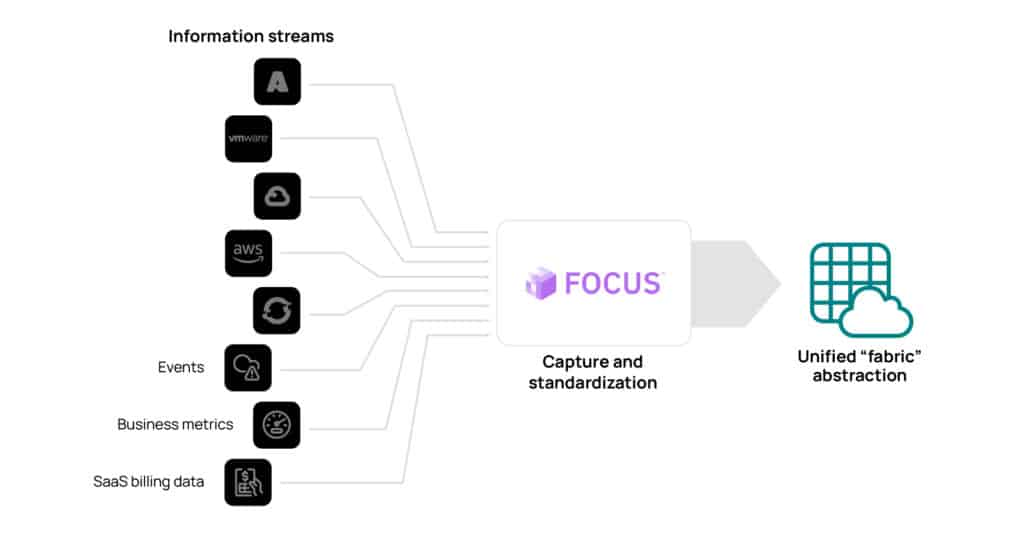
CloudBolt’s cost allocation and chargeback capabilities cover public cloud and private infrastructure in one view. Budget thresholds, reservation utilization tracking, and chargeback reports all run from the same platform. For teams formalizing their FinOps practices, CloudBolt’s FOCUS-compliant data platform normalizes billing data to the FinOps Open Cost and Usage Specification, reducing the need for custom pipeline work and making cross-provider reporting far more reliable.
Why CloudBolt:
The power to build, manage, and optimize any cloud
#3 Governance and policy enforcement
Each major cloud provider has its own access control model. AWS uses IAM policies, Azure uses RBAC, and GCP has its own IAM with org-level and project-level hierarchy. These models are not interchangeable, and mapping between them requires ongoing effort. In practice, most multi-cloud teams maintain separate governance frameworks per provider. However, this creates challenges if configuration drifts or a policy update on one provider isn’t reflected across the others.
Governance enforced at the multi-cloud management platform level avoids this. Policy controls that can be embedded directly into provisioning workflows include:
- VM size restrictions per team or environment
- Mandatory tagging before any resource deploys
- Budget thresholds that block provisioning entirely when a team is near the limit
- Approval workflows for high-cost requests through existing ITSM workflows
They can be applied uniformly across environments and can run before a resource deploys rather than as a retrospective audit.
Consider an engineer submitting a request to provision a c5.4xlarge on AWS without a cost center tag. Without governance at the multi-cloud platform level, that request either goes through unchecked or gets caught in a manual review process with inconsistent enforcement depending on who reviews it.
With governance embedded at the multi-cloud platform layer, the sequence is different. The blueprint runs a pre-deploy policy check. The request is blocked. An approval workflow routes to the team lead in ServiceNow. The engineer receives a notification that explains exactly which policy failed. There are no inconsistencies due to manual reviews.
The screenshot below demonstrates an example of CloudBolt’s VM size restriction based on the budget blueprints in practice.
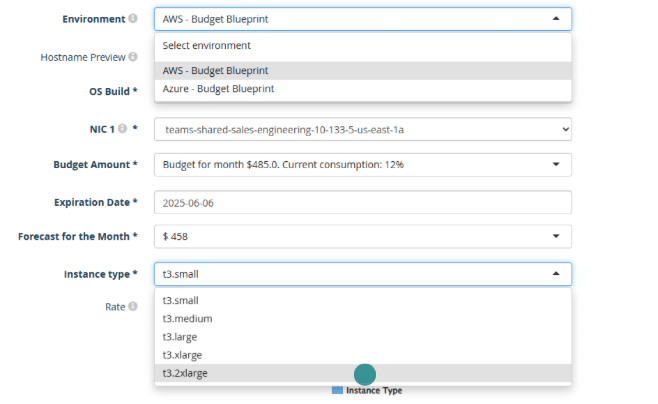
CloudBolt’s governance and compliance capabilities let teams define policies once and push them across all connected environments. Permissions are managed through a centralized groups and roles model that maps to existing org structures without requiring a separate identity management layer. Teams running ServiceNow can route approval workflows through their existing ITSM processes using CloudBolt’s ServiceNow integration, which keeps change management in one place rather than splitting it across two tools.
#4 Self-service catalogs
Infrastructure tickets are a familiar frustration. An engineer submits a request, a platform team member reviews it, manually provisions the resource, and the whole cycle takes a day or two. Multiply that by the request volume of a growing engineering workload, and you get platform teams that spend most of their time on provisioning over platform management.
Self-service catalogs change the dynamic. The difference between the two models is straightforward:
| Category | Ticket-based provisioning | Catalog-based provisioning |
| Raising a request | The engineer submits a request as a ticket | The engineer browses pre-approved configurations and chooses what they need. |
| Resource provisioning | The platform team reviews the ticket and manually provisions infrastructure. | The resource deploys automatically with guardrails already applied. |
| Turnaround time | Days | Hours |
The governance angle matters here as much as the speed. Guardrails are built into catalog-based provisioning. The platform team defines the boundaries once. After that, provisioning is self-serve.
VM sizes are constrained to approved options, tags are applied automatically, and cost limits are enforced per team.
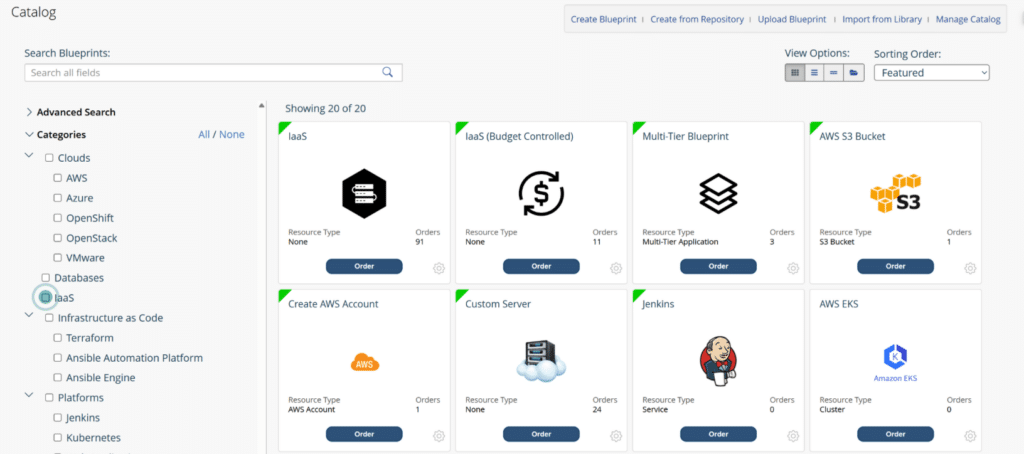
A well-designed catalog is also how you prevent shadow IT. If engineers can get what they need quickly through the approved channel, they have little reason to go around it.
CloudBolt’s self-service provisioning uses role-based access controls to determine which catalog items each group can see and order. Organizations can keep resource provisioning inside governance boundaries across both private and public cloud environments.
#5 Monitoring and observability
AWS CloudWatch, Azure Monitor, and GCP Cloud Monitoring each do a reasonable job of surfacing metrics for their own environments. The problem is that they are separate systems, each showing a different slice of your infrastructure. A capacity planning decision that looks reasonable when you’re only looking at AWS utilization may look different when factored against what’s underutilized on Azure.
Consider a common hybrid setup with an application that runs on cloud VMs backed by an on-prem database tier. A latency spike appears in the application layer. Your team investigates in CloudWatch, checks response times, and looks at auto-scaling events. Everything in the cloud tier looks normal.
The actual cause is I/O contention on the on-prem database, but that data lives in a completely separate monitoring system. Without a consolidated view, the on-call engineer is context-switching between two tools while users experience lag.
A multi-cloud platform consolidates observability by aggregating metrics, cost trends, and utilization data across all environments into a single view. Platform teams can correlate performance data across providers without switching between dashboards. This is especially useful where on-prem and cloud workloads serve the same applications and need to be understood together.
CloudBolt’s hybrid cloud reporting brings cost and performance data from cloud and on-prem infrastructure into a single view. Connecting utilization trends to spending anomalies becomes much more tractable when you’re not reconciling data from three separate monitoring systems to do so.
#6 Automation and IaC integration
Manually coordinating infrastructure changes across two or three clouds is not practical at scale. Continuous deployment pipelines, rolling patches across hundreds of instances, and decommissioning workflows that need to run reliably on a schedule all require automation that native cloud tooling was not designed to provide across providers.
To scale smartly, you need a multi-cloud platform that coordinates existing tools rather than displacing them. For example,
- Terraform still manages infrastructure state.
- Ansible still handles configuration management.
- ServiceNow still routes change requests.
- CI/CD pipelines still trigger deployments.
The multi-cloud platform wraps all of them inside a single orchestration layer that applies consistent governance and tracks state across every tool in the chain.
Let’s walk through what a chained workflow actually looks like in practice. An engineer orders a blueprint for a new application environment. The sequence runs like this:
- CloudBolt triggers a Terraform plan for the infrastructure resources.
- A pre-deploy policy check runs against the plan output before anything applies.
- The Terraform plan applies across the target cloud provider.
- An Ansible playbook runs to configure the provisioned instances.
- A ServiceNow change ticket is automatically closed on completion.
Each step is tracked in the platform. If the policy check in step 2 fails, the workflow stops there. The engineer gets a notification with the specific policy that blocked the request. There are no partial deployments or manual cleanups.
CloudBolt’s orchestration capabilities support Terraform, Ansible, ServiceNow, and CI/CD integration through a composable blueprint orchestration model. Teams don’t need to replace their existing tools; CloudBolt adds an orchestration layer that coordinates them, enforces consistent governance, and preserves prior investments..
For GitOps workflows, CloudBolt supports blueprints sourced from remote repositories. Infrastructure definitions stay in version control, and changes go through the same review process as application code rather than being applied directly through a UI.
Empower your teams with self-service
Accelerate innovation without sacrificing control, governance, or cost visibility
Conclusion
Multi-cloud infrastructure gets harder to manage as it scales. The second cloud provider doubles your IAM models and billing formats. The third multiplies the governance surface. On-prem adds another layer entirely. Native tools handle their own slice well enough, but they were never designed to coordinate across the whole ecosystem.
A multi-cloud platform allows teams to coordinate without rebuilding toolchains from scratch. Provisioning, governance, cost management, observability, and automation run through a single platform, reducing the overhead of context-switching between provider consoles and closing policy gaps.
CloudBolt brings all of this together for teams managing cloud and on-prem environments at scale. The platform is built around the idea that velocity and governance are not mutually exclusive. Teams can rapidly provision self-service resources, enforce consistent policy across every environment, and track spending accurately, all without maintaining separate tools for each.


Related Blogs
VMware Aria alternative for VCF 9: Aria vs CMP – Part 2
Part 2 of 3. Read Part 1: why companies are making the move | Read Part 3: testing VMware alternatives…